The platform your team needs to stop losing tickets and billable hours
End-to-end customer support management powered by artificial intelligence: tickets, hour banks, sprints, knowledge base and autonomous agents. Everything connected. Everything traceable. Built for teams that manage clients.
More than 20 integrated modules. No per-user licenses. Your platform, your data, your control.
Your team manages clients with 5 tools that don't talk to each other
A timesheet spreadsheet nobody updates. Tickets by email that get lost. A Trello board abandoned months ago. WhatsApp for emergencies. Sound familiar?
Most don't complain: they simply leave. And they take their recurring contracts with them.
Without automatic tracking, you give away hours of work to your clients every week.
Email, Slack, Jira, Excel... How many windows do you have open right now?
One platform, all your clients
Every module connects with the others in real time. No broken integrations, no duplicated data.
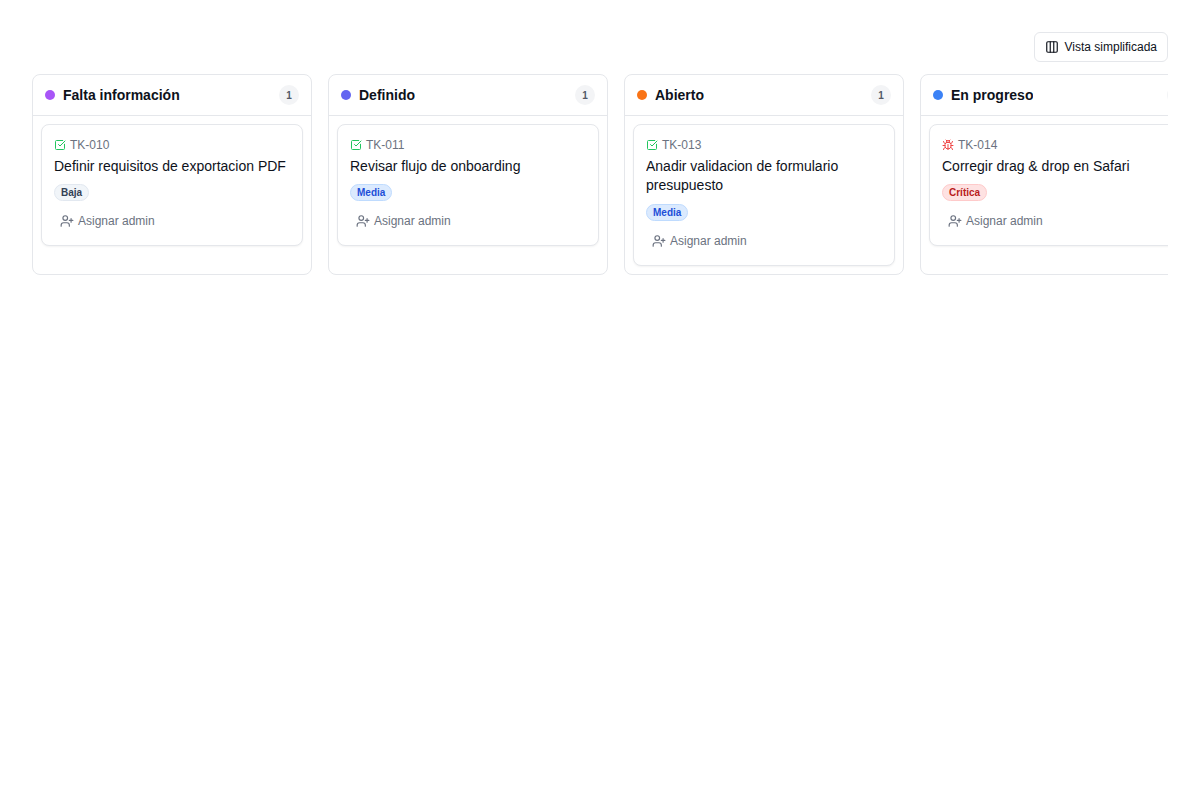
Every ticket has an owner, a status and a complete history
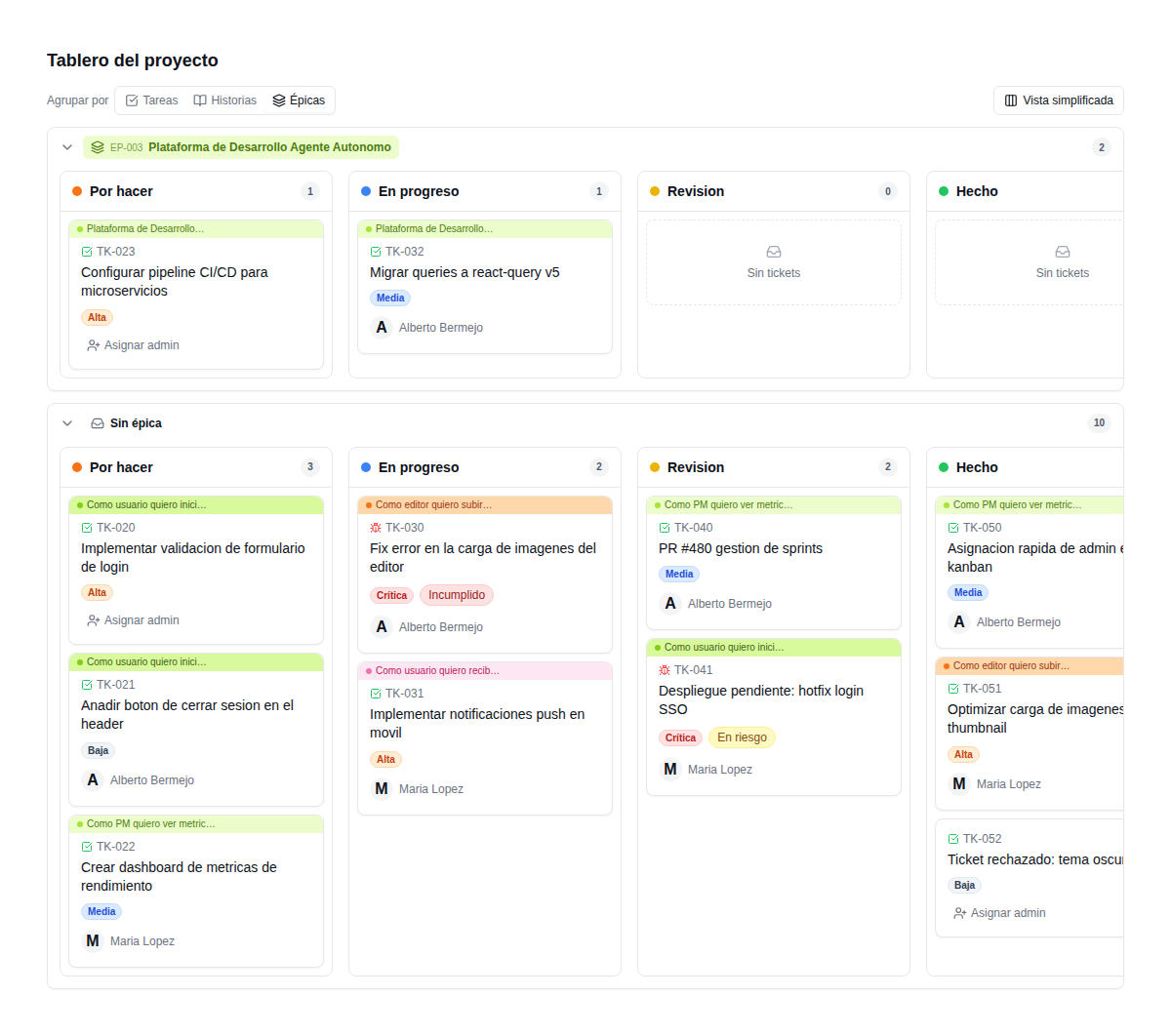
Kanban board with configurable statuses: Needs info, Defined, Open, In progress, In review, Pending deploy, Resolved. Every ticket has a visual priority (low, medium, high, critical), an assigned admin, a type (support, story, task, epic, bug) and a complete activity timeline.
- Drag & drop Kanban with filters by type, priority and assignee
- Comments with markdown, mentions and media attachments
- Full-ticket PDF export to document work for your client
- Change subscriptions: get notified about what matters to you
- Group by epics to visualize project progress
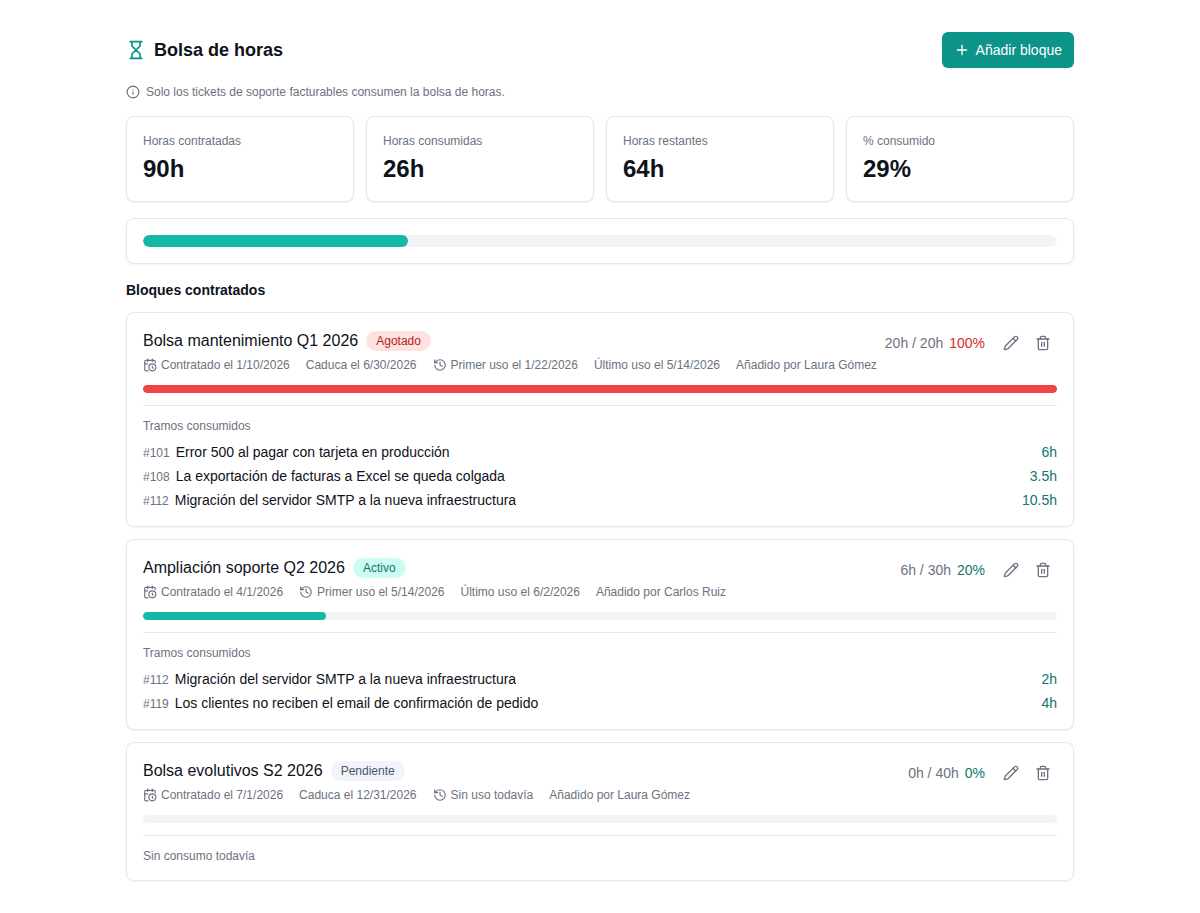
Every hour you work for a client is logged automatically
Contracted blocks with start date, expiry and real-time consumption. Every billable support ticket draws from the hour bank. Visual progress bars. Clients see their own consumption in a limited view. Alerts when a bank is about to run out.
- Blocks with purchase and expiry dates
- Automatic consumption linked to every support ticket
- Depletion and budget-overrun alerts
- Differentiated views: admins see everything, clients see their consumption
- History of time consumed by each ticket
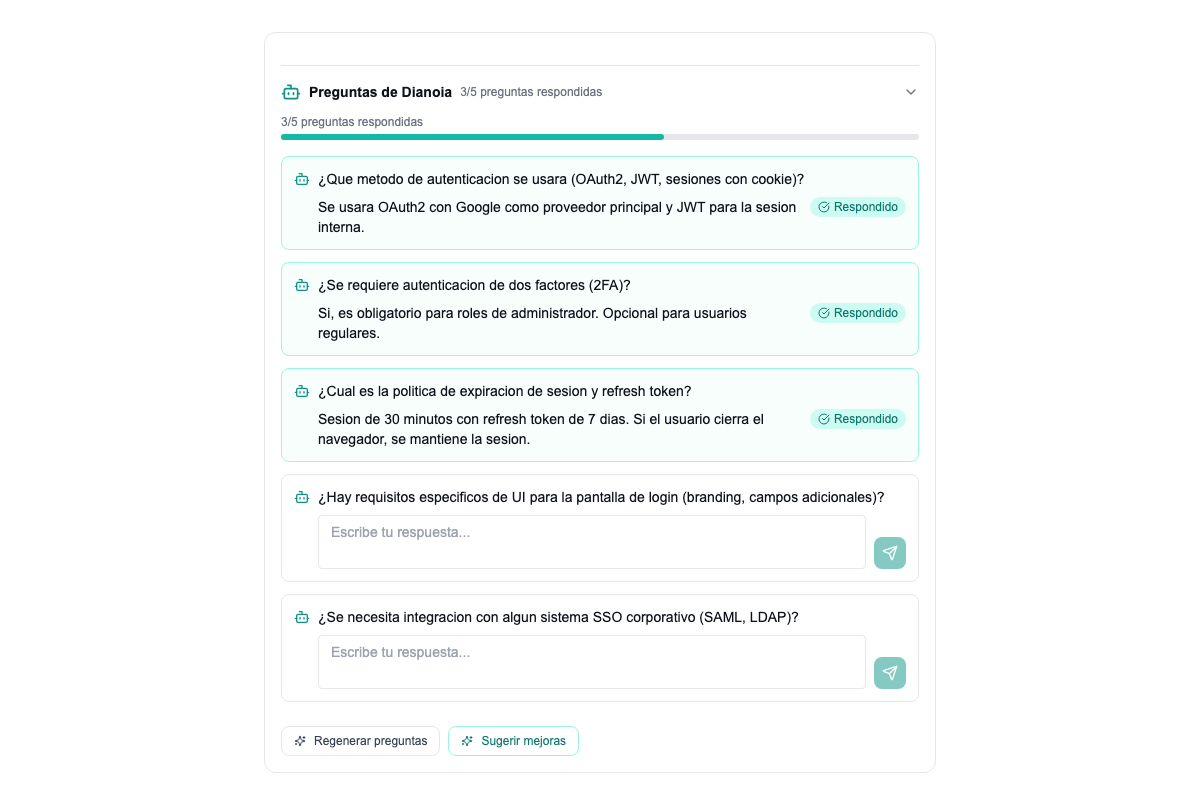
AI asks what your team needs to know before starting
When a client creates a ticket with incomplete information, the AI automatically generates 3 to 8 clarifying questions. Your team stops wasting time asking for details: the system does it on its own. It also analyzes client sentiment (positive, neutral, negative, frustrated) and suggests priority and tags.
- AI-generated clarifying questions
- Sentiment analysis: detect frustration before it escalates
- Automatic priority and tag suggestions
- AI summaries of long conversations
- Regenerate questions or request improvements in one click
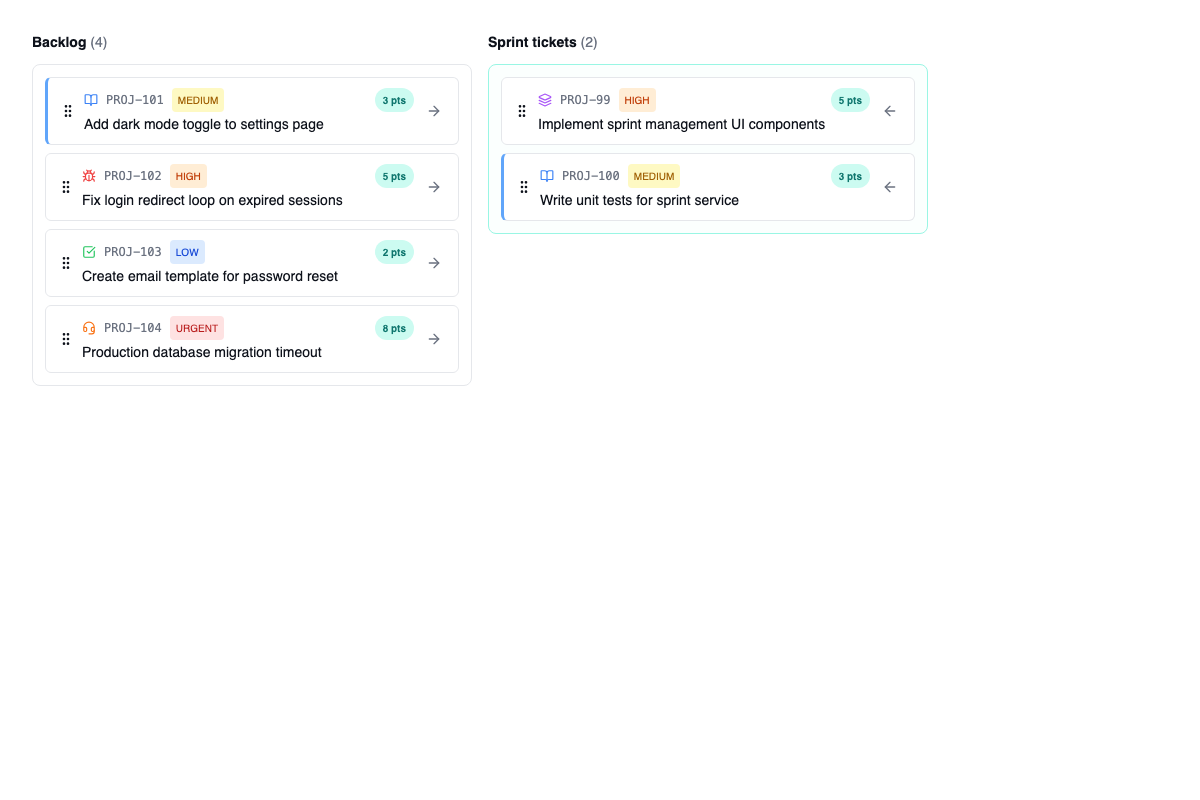
Organize your team's work into sprints with story points
Backlog with drag & drop into the sprint. Full hierarchy: Epics containing Stories containing Tasks. Every item has story points, priority and acceptance criteria. Kanban or backlog view. CSV import and export to fit in with the tools you already use.
- Sprint planning with drag & drop from the backlog
- Epics, stories, tasks and bugs with hierarchy
- Story points and visual progress per epic
- Acceptance criteria linked to tasks
- CSV import/export
Your team and your clients access the same up-to-date documentation
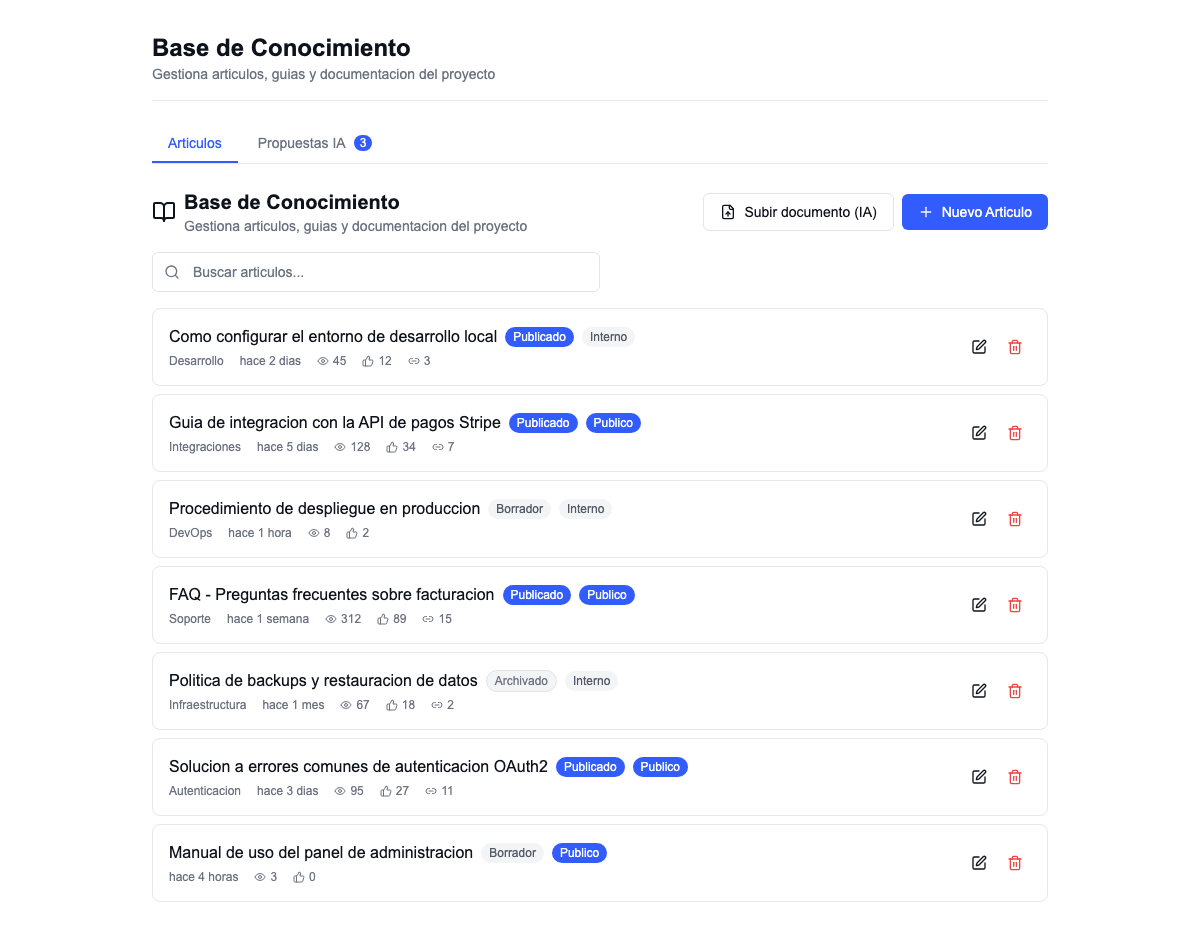
Articles with automatic versioning, categories and configurable visibility (public or internal). AI proposes new articles based on frequent tickets. Upload documents (PDF, Word) and the system ingests and structures them automatically. Every article links to its related tickets.
- Articles with versioning and categories
- Public (clients) or internal (team) visibility
- AI ingestion of PDF and Word documents
- Automatic article proposals based on tickets
- Article-ticket linking for instant context
Agents that resolve tickets while your team sleeps
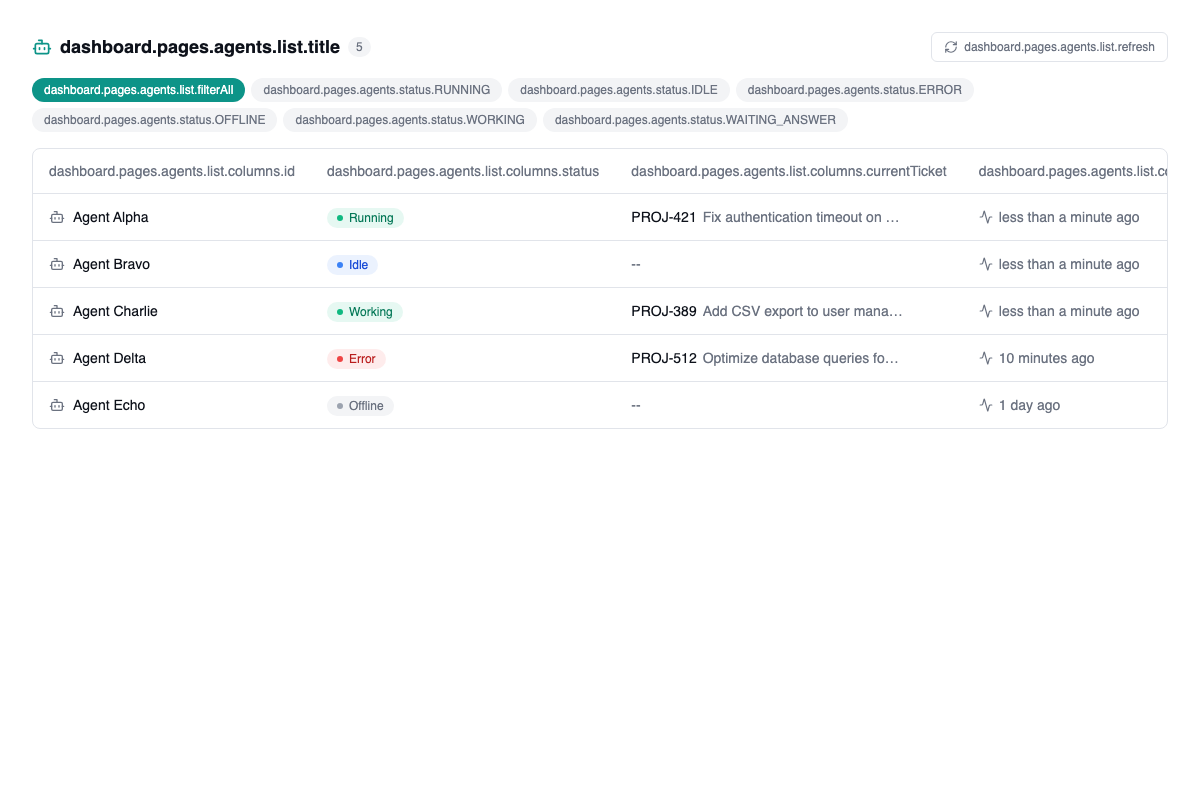
Autonomous agents that can claim tickets, analyze the problem, generate pull requests with the fix, send reminders to the client and run tasks in the background. A full dashboard with status (running, idle, working, error), currently assigned ticket and detailed activity logs.
- Autonomous agents that claim and work tickets
- Automatic pull request generation
- Automatic client reminders
- Activity logs and per-agent metrics
- Filter by status: running, idle, error, offline
Every change on every ticket is recorded forever
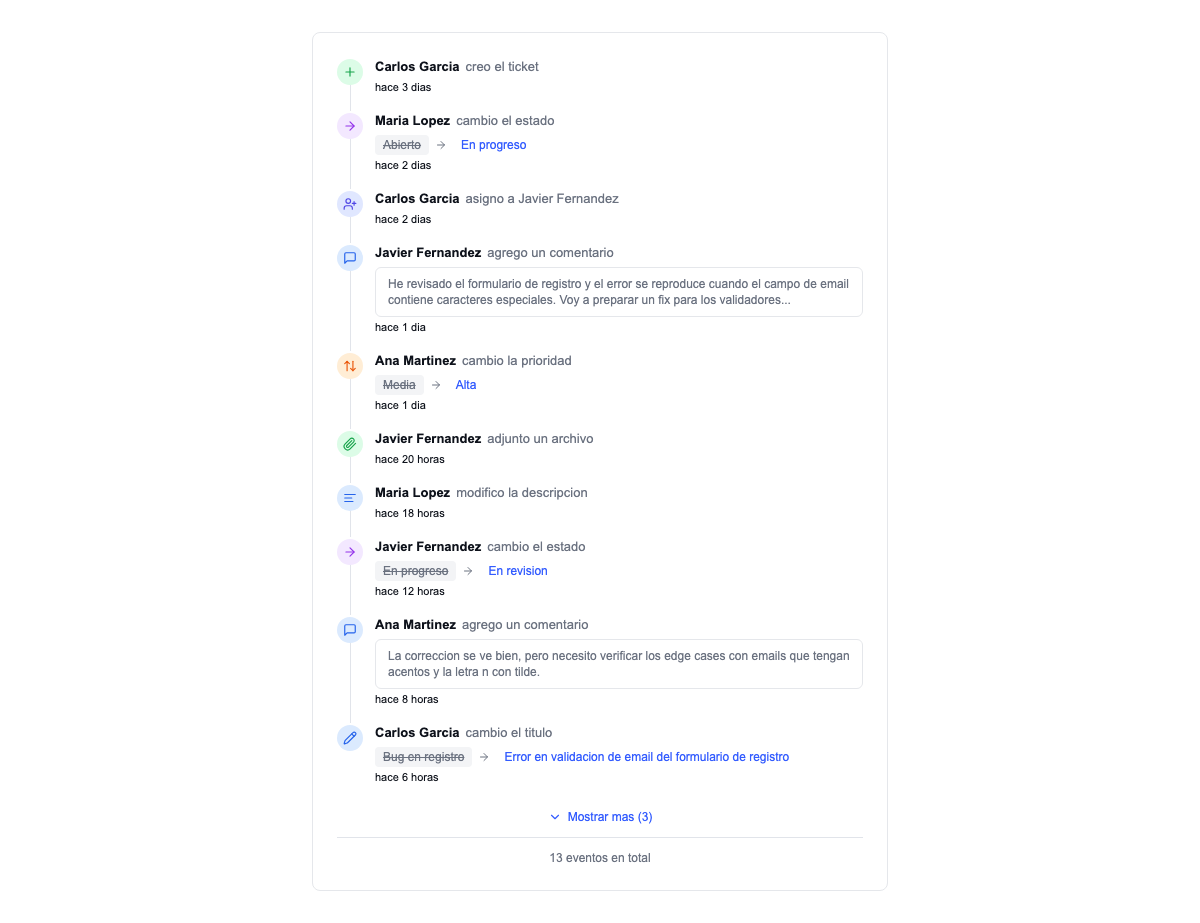
A complete activity timeline: creation, status changes, assignments, comments, attachments, priority changes, title edits. Who did what and when. A full audit trail to justify hours and decisions to your client. Expandable to view the complete history.
- Chronological timeline with every event
- Who, what and when for every action
- Inline comments with the context of each change
- Justify hours and decisions to your client
Your clients create tickets, track status and leave feedback without interrupting you
A public portal where clients sign up (email or Google OAuth), create tickets with attachments, follow progress in real time and leave a CSAT rating when the ticket is resolved. Fewer emails, fewer calls, more autonomy for clients and fewer interruptions for your team.
- Sign-up with email or Google OAuth
- Ticket creation with media attachments
- Real-time status tracking
- Automatic CSAT surveys on resolution
- Public FAQ and knowledge base
Everything you need, integrated out of the box
It's not a generic SaaS. It's your platform.
No per-user licenses
Add your whole team and all your clients without the bill going up. 5 or 50 users, same price.
Your data, your control
Export all your data at any time. GDPR compliant. No vendor lock-in on your information.
Fits how you work
Configurable statuses, workflows, fields, roles and permissions. You don’t adapt to the software — the software adapts to you.
AI built in as standard
Not a paid add-on or an external integration. AI questions, agents and sentiment analysis come included.
Everything you pay for separately today, built in as standard
| What you need | The usual stack | With Soamee |
|---|---|---|
| Support | A helpdesk priced per agent | Ticketing with no user limits and a client portal included |
| Billable hours | An hours spreadsheet nobody fills in | Hour banks that draw down on their own with every ticket and warn you before they run out |
| Product & development | Yet another project management subscription | Sprints, epics and story points on the same tickets |
| Documentation | A separate wiki that goes stale | A knowledge base linked to the ticket, with AI ingestion of PDF and Word |
| Artificial intelligence | A paid add-on charged per seat | Automatic questions, summaries, sentiment analysis and agents, as standard |
| Your brand with clients | The vendor’s logo on every screen | Per-project white-label: your logo, your colors, your domain |
| Your data | Limited exports and vendor lock-in | Full export at any time, automated backups and GDPR compliance |
One login, one history, one tool to maintain. And adding one more teammate doesn’t change what you pay.
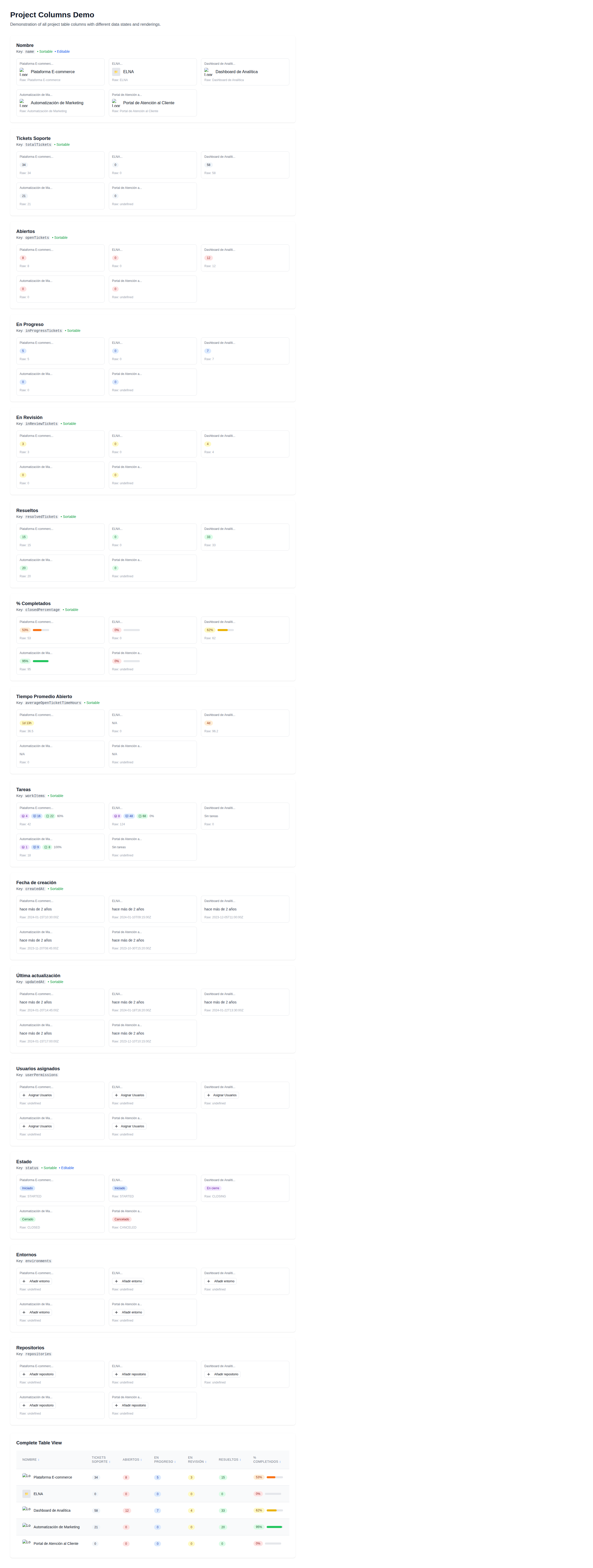
Manage 5 or 50 projects from the same platform
Every client is a project with its own branding, repositories, environments, tickets and assigned team. A consolidated view with KPIs: total tickets, open, in progress, resolved, average resolution time, assigned users. Switch projects with one click.
White-label included: every project can have its own logo, colors and custom domain. Your clients see their portal, not yours.
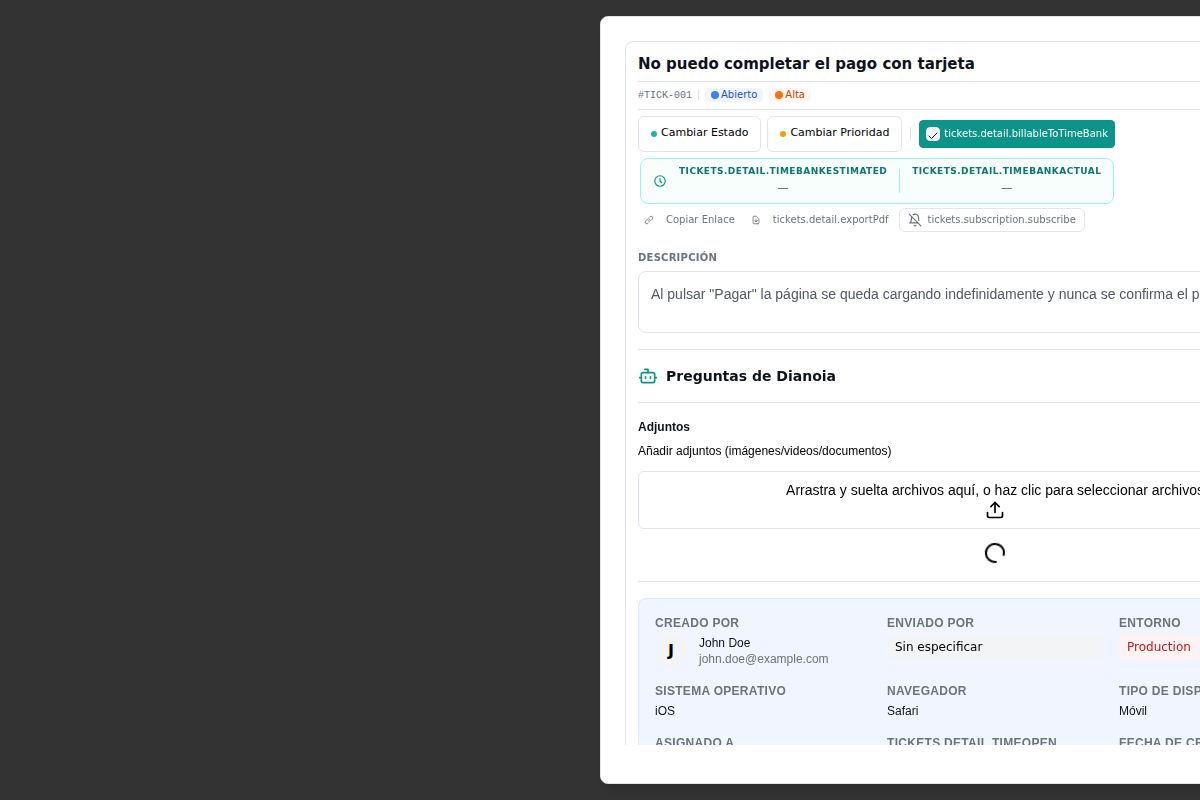
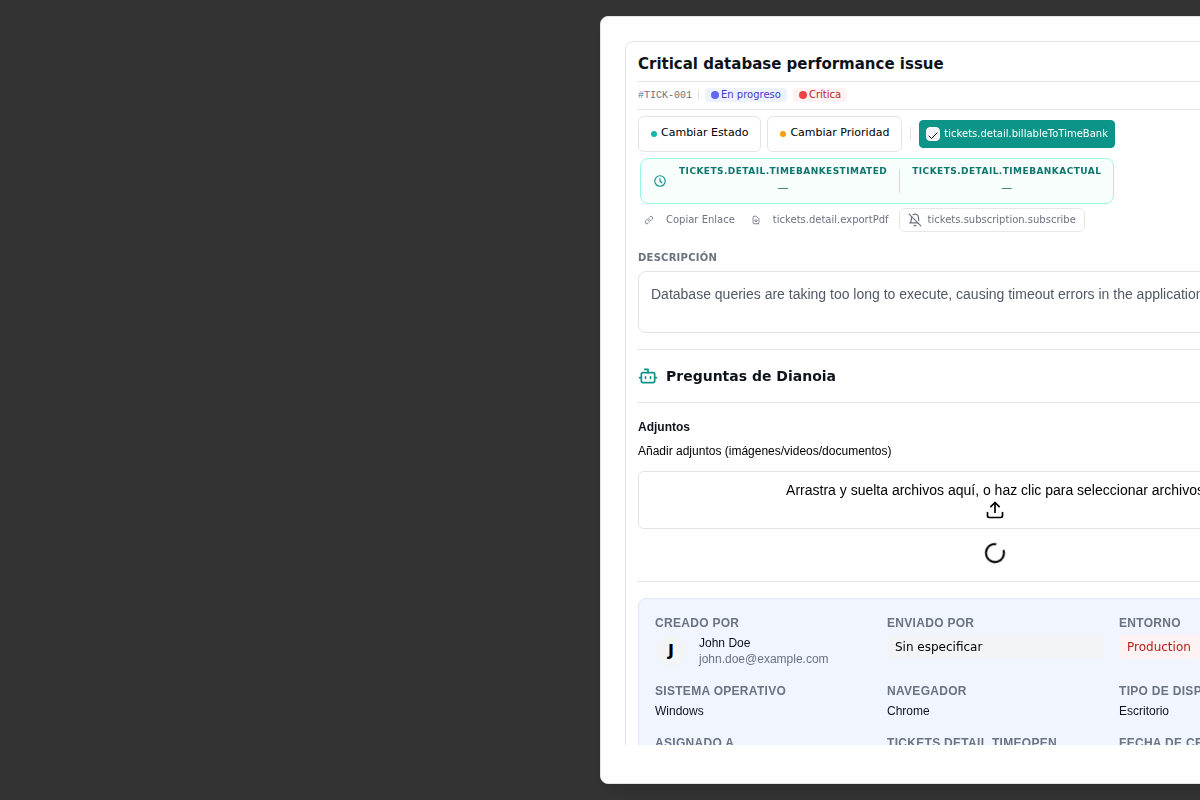
All the ticket information in a single place
Status, priority, assigned admin, linked hour bank, estimated and actual hours, affected environment, the client's operating system and browser, creation date, AI questions, attachments and the complete conversation. All without leaving the screen.
Change status and priority with one click. Enable the hour bank so the ticket consumes hours automatically. Export to PDF to send to your client.
Why is your team drowning in tickets?
Six questions on how requests arrive, get prioritised and get closed. Score and priorities, with no email needed to see them.
Centralize your customer support.
See it running before you decide.
We walk you through the platform live with your real cases: tickets, hour banks, sprints, knowledge base and AI agents. Guided demo, no commitment, no cost.