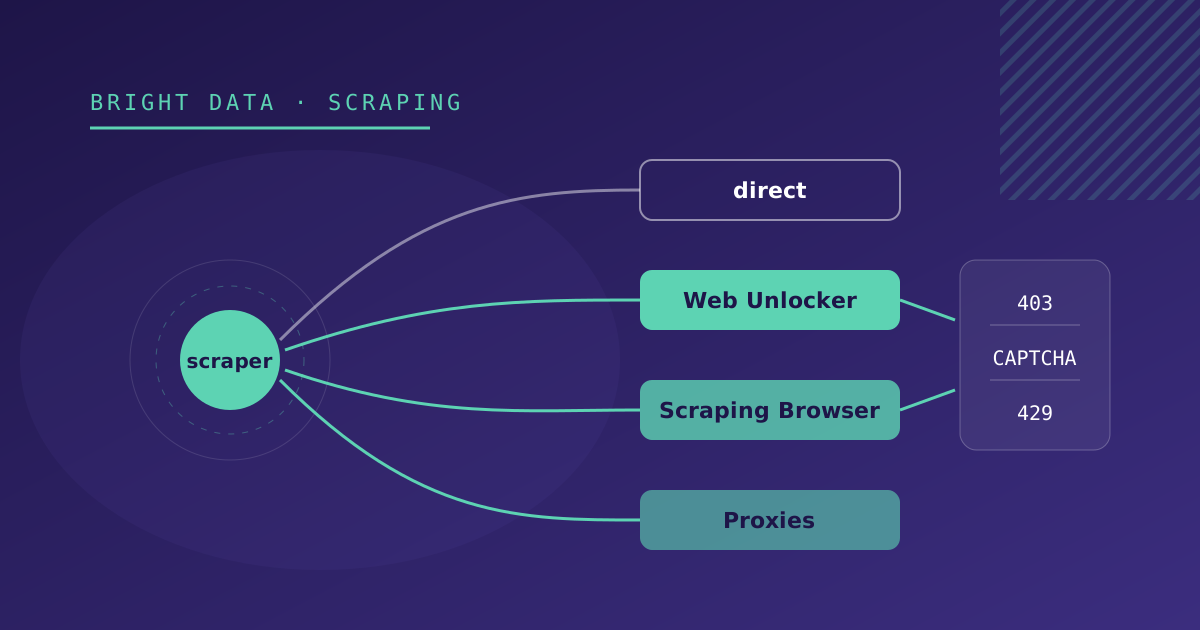
Three symptoms end in the same question. The site returns 403 to your scraper. Or it responds with a verification page instead of the content. Or it works for a few requests and then answers 429 or stops responding. The question is whether you need to pay a provider like Bright Data.
Sometimes you do. But before signing up for anything, rule out the cheap fixes, because some blocks are solved with one line of code. And when you do need it, enable it only on the sources that need it.
First, rule out the cheap fixes
The User-Agent. By default axios identifies itself as axios/1.x, and many sites block that User-Agent without further analysis. Sending a real browser’s headers (User-Agent, Accept, Accept-Language) unblocks more sources than you would expect.
The pace. A 429 is the site asking you to slow down. Respect the Retry-After header, space out your requests and ask yourself whether you really need to check every hour something that changes once a day.
A self-hosted headless browser. If the content is rendered by JavaScript, Playwright is usually enough. We cover this in detail in how to choose the strategy for each source.
If the source still returns 403 after that, the block depends on something you cannot control from your server: the reputation of your datacenter’s IP, the browser fingerprint or a CAPTCHA. That is where Bright Data comes in.
Which product for each symptom
| Symptom | Bright Data product | Why |
|---|---|---|
| 403 or verification page, with the content in the HTML | Web Unlocker | Handles CAPTCHAs, fingerprinting and retries behind a single request |
| Anti-bot block on a page that needs JavaScript or interaction | Scraping Browser | Remote browser with unblocking included; your Playwright code does not change |
| 429 or IP block after a few requests | Residential or ISP proxies | Spread requests across IPs with a better reputation |
| Different content depending on the country | Proxies pinned to a country | The request goes out from an IP in the country you need |
| Google or Bing results | SERP API | Returns the results already structured as JSON |
| Large domains (marketplaces, professional profiles) | Web Scraper API or Datasets | Bright Data already maintains the extractor; you request the data |
Each one is purchased and configured as a “zone” in the Bright Data dashboard, with its own credentials. That lets you use several in the same project, each on the sources that need it.
Web Unlocker: the one that changes your code the least
Web Unlocker can be used in two ways. The simplest is as a proxy: the request goes out as before and Bright Data handles the unblocking along the way.
import axios from 'axios';
import { HttpsProxyAgent } from 'https-proxy-agent';

const { BRD_CUSTOMER, BRD_UNLOCKER_ZONE, BRD_UNLOCKER_PASSWORD } = process.env;

const agent = new HttpsProxyAgent(
  `http://brd-customer-${BRD_CUSTOMER}-zone-${BRD_UNLOCKER_ZONE}:${BRD_UNLOCKER_PASSWORD}@brd.superproxy.io:33335`,
);

const { data: html } = await axios.get(url, { httpsAgent: agent, proxy: false });
Because Bright Data intercepts the HTTPS connection to unblock it, you have to load its CA certificate in the client (for example with NODE_EXTRA_CA_CERTS). Disabling TLS verification as a shortcut is a bad idea: it affects the whole process, not just that request.
The other way is its REST API: a POST to https://api.brightdata.com/request with the zone and the target URL, which returns the HTML. It is more convenient if the scraper runs somewhere a proxy is awkward to configure, such as some serverless functions.
Either way, what comes next (cheerio, selectors, normalization) stays the same.
Scraping Browser: your Playwright, with a different browser
If the source needs a browser, Scraping Browser replaces the Chromium you launch on your server with a remote one on Bright Data’s infrastructure. You connect over CDP:
import { chromium } from 'playwright';

const { BRD_CUSTOMER, BRD_BROWSER_ZONE, BRD_BROWSER_PASSWORD } = process.env;
const endpoint = `wss://brd-customer-${BRD_CUSTOMER}-zone-${BRD_BROWSER_ZONE}:${BRD_BROWSER_PASSWORD}@brd.superproxy.io:9222`;

const browser = await chromium.connectOverCDP(endpoint);
try {
  const page = await browser.newPage();
  await page.goto(url, { timeout: 120_000 });
  await page.waitForSelector('.agenda-item');
  // ...same extraction as with the local browser
} finally {
  await browser.close();
}
What changes compared with a local browser:
- More latency. The browser is far away and does the unblocking before returning the page. Raise the navigation timeouts.
- One session per source. We open the browser, extract and close it. Keeping long sessions open costs money and adds nothing.
- No more binary to manage. You no longer need to install Chromium in the Docker image or watch its path in every environment, which is one of the causes of downtime we documented in how we monitor scrapers in production.
Proxies: when the problem is the IP
If the site has no anti-bot protection but limits by IP, or shows different content depending on the country, proxies are enough. Bright Data offers four types:
- Datacenter: the cheapest and fastest, but with IPs that are easy to identify as non-residential.
- ISP: residential IPs hosted in datacenters. Stable and fast; good for long sessions.
- Residential: IPs from real devices. The hardest to block.
- Mobile: IPs from mobile carriers, for the toughest cases.
Two parameters are set in the proxy username:
-country-esmakes the request go out from Spain.-session-<id>keeps the same IP across requests, useful when the site ties pagination or cookies to the IP.
Integrating it as one more strategy
When we integrate Bright Data, the transport becomes a property of the source, not of the code. In each source’s configuration:
{
  "strategy": "html-scraper",
  "transport": "unlocker",
  "listUrl": "https://ejemplo.com/agenda"
}
with transport set to direct, unlocker, browser or proxy. The HTTP client or the browser is built from that field, and the rest of the pipeline does not know whether the request went through Bright Data. Moving a source to Bright Data, or back to direct, means editing one field.
Credentials go in environment variables, one zone per product. Never in the source configuration, which usually lives in the database where more people can see it.
Keeping usage under control
Bright Data charges by usage, and the unit depends on the product: requests, GB transferred or results. To keep the bill from surprising you:
- Measure per source. Requests, success rate and volume, stored with each run. A source that suddenly uses three times as much is usually failing and retrying.
- Do not request detail pages you already have. If the listing carries a stable ID, visit the detail page only for new items.
- Adjust the frequency. A source that changes once a day does not need to run every hour.
- Review every month which sources can go back to direct. Sites switch protection providers, and sometimes loosen it.
What Bright Data does not solve
Bright Data solves technical access. Everything else is still your job:
- Redesigns. If the site changes its CSS classes, the selector fails just the same. You still need smoke tests.
- Dates, prices and duplicates. Normalization is the same with or without unblocking.
- Legal limits. Terms of use, database rights and the GDPR if personal data is involved apply just the same. Bright Data also has a customer verification process and may restrict certain targets or uses.
If you have sources that return 403 or a CAPTCHA, our Bright Data integration page explains how we set it up, and the web scraping service page covers how it fits with the rest of the pipeline.