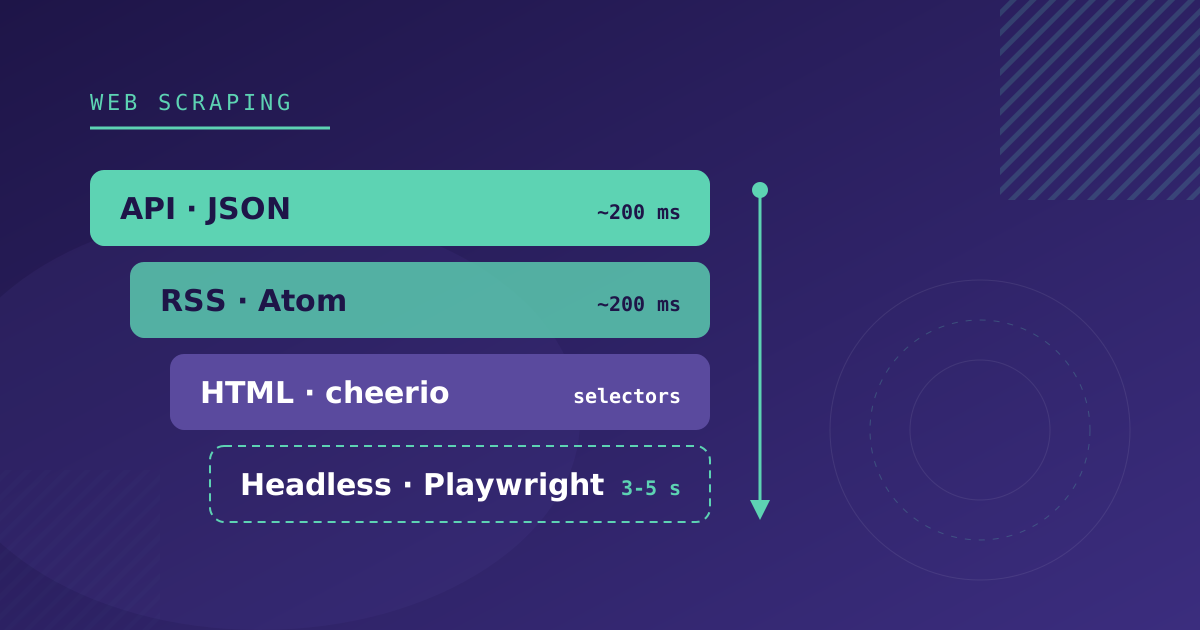
When a list of websites to pull data from lands on our desk, the temptation is to open Playwright and start writing selectors. Of the four strategies we use, it is the slowest, the most memory-hungry and the one that breaks most often.
In an aggregation project we maintain, with more than 35 public sources (open data portals, sites built on WordPress, Drupal and React, and a few hand-built ones), we ended up with four strategies behind a single interface and one rule for choosing between them: the first one on the list that the source allows.
The four strategies, from most stable to most fragile
| Strategy | When | Cost | What breaks |
|---|---|---|---|
| Public or internal API | The site loads its data from JSON | ~200 ms per request | Schema changes, which are rare |
| RSS / Atom | There is a feed and title, link and summary are enough | ~200 ms per feed | The feed date is not the content date |
| Static HTML | The content comes in the server HTML | One request per listing, plus detail pages | The selectors, with every redesign |
| Headless browser | JavaScript, infinite scroll, “load more” | 3-5 s per page, 100-200 MB of RAM | Wait times and the browser binary |
Every step down costs speed and stability. That is why the inventory of each source always starts at the top.
1. Look for the API before you look at the HTML
Far more sites than you would expect load their data from JSON. There are three places to look, in this order.
Open data portals. Many public administrations publish their datasets as JSON or CSV under a reuse license. They are the best possible source, though not the cleanest. In one of ours, the price arrives as an empty string when there is no price, the “free” field comes as a numeric 0 or 1, and the address is a nested object with hyphenated keys (street-address) that our dot-path mapping did not resolve on the first try. None of those details are in the portal’s documentation: they show up when you process the first real response.
WordPress. A huge share of small and mid-sized sites run on WordPress, and many leave their REST API open. Try /wp-json/wp/v2/posts. If the site uses a calendar plugin like The Events Calendar, /wp-json/tribe/events/v1/events returns events with start date, end date, venue and cost already structured. Three of our sources, which at first glance called for an HTML scraper, are pulled this way.
The Network tab. Open DevTools, filter by Fetch/XHR and reload. If the site is an SPA, the data comes from some endpoint, and it often accepts date and pagination parameters. One of our sources, an online box office, only returns a two-week window, so the URL stored in the configuration carries placeholders that are resolved on every run:
https://ejemplo.com/api/sesiones?desde={{today}}&hasta={{today+14}}Before using an internal endpoint, read the site’s terms of use. A JSON being reachable does not mean reusing it is allowed.
2. RSS: fast, but the date is a trap
An RSS feed is processed in milliseconds and almost never changes format. The problem is what it leaves out. Each item’s pubDate is the date the article was published, not the date of the event, offer or product it talks about. And there is no price, no venue and no end date.
On top of that, media feeds mix content types. One we use includes articles, venue pages and guides in the same channel; the guid carries a prefix per type (Content-Venue-213605, Content-Article-…), and that is what lets us separate them.
We use RSS as a discovery source: it detects that there is something new and, if needed, we visit the detail page to fill in the data.
3. Static HTML, with the selectors in configuration
When the content comes in the HTML the server returns, an HTTP request and cheerio are enough. The decision that has saved us the most time here is keeping the selectors in the source configuration instead of in the code:
{
  "listUrl": "https://ejemplo.com/agenda",
  "selectors": {
    "card": ".agenda-item",
    "title": ".agenda-item__title",
    "link": "a",
    "date": ".agenda-item__date",
    "image": "img"
  }
}
When the site is redesigned, the fix is editing that JSON. No deploy needed.
Two cases to plan for:
- Hashed classes. Sites built with Gatsby or Next.js and CSS Modules generate classes like
card-module--title--a1b2c, and the hash changes with every build of the site. The selector has to match by prefix:[class*="card-module--title"]. - Incomplete listings. If the listing card has no description, you have to visit each item’s detail page. We do it in batches with limited concurrency, and only for items that do not have it yet.
4. Headless browser, when there is no other option
Playwright is needed in three situations: the content is rendered with JavaScript, the page loads more results on scroll or with a “load more” button, or the site rejects any HTTP client that is not a browser.
What we have learned maintaining it:
- Wait for a specific selector, not a fixed time.
waitForSelector('.agenda-item')is reliable;waitForTimeout(3000)fails the day the site is slow. networkidlemay never arrive on sites with analytics or chat widgets that keep firing requests. After clicking “load more” we accept thenetworkidletimeout and check whether new cards have appeared.- Close the browser in a
finally. Each Chromium instance takes between 100 and 200 MB, and a browser left open after an exception eventually takes down the worker. - The binary is part of the deployment. We launch Chromium from a path set by an environment variable, and the Docker image installs it. An environment that lost that variable had a source down with
browserType.launch: Executable doesn't exist, and there was nothing wrong with the code.
A self-hosted browser does not get past every block. Several of our sources return 403 to any HTTP client, one of them with an open robots.txt. If the block depends on the IP or the browser fingerprint, Playwright launched from a datacenter server does not get through either. For those cases we integrate Bright Data on that specific source, without touching the others.
The problem they all share: Spanish-language dates
Whatever the strategy, at some point you have to turn text into dates. Our sources are Spanish, and they mix «Del 10 al 28 de junio» (“from 10 to 28 June”), «Martes, 3 de marzo» (“Tuesday, 3 March”), «jun 25», «25.06» and «25/06/2026».
The trap is JavaScript’s Date. In Node:
new Date('25 junio')  // Mon Jun 25 2001
new Date('jun 25')    // Mon Jun 25 2001
new Date('10')        // Mon Oct 01 2001
V8 recognizes “jun” as June from the first three letters and, with no year, falls back to 2001. It throws no error: the event is stored with a date 25 years in the past and disappears from every listing.
The rules we apply, in this order:
- Strip the weekday from the start («Martes, »).
- Try the explicit numeric formats:
DD.MM.YYYY,DD.MM,DD/MM/YYYY. - Try Spanish month names before
new Date(), and use the current year when there is none. - Use
new Date()only at the end, and discard bare numbers and any year before 2000. - In ranges like «Del 10 al 28 de junio», the start inherits month and year from the end.
Every odd format that shows up in a new source becomes a test case.
One interface, four implementations
What lets us mix strategies without the system getting complicated is that they all return the same thing:
interface SourceStrategy {
  fetch(source: Source): Promise<RawItem[]>;
}
A registry resolves the strategy from the key stored on each source (api, rss, html-scraper, dynamic). Then every result goes through the same normalizer (strip HTML, clean whitespace, turn categories into slugs, infer whether it is free) and is stored with a unique key per source and external ID. Re-running a source updates what already existed and duplicates nothing.
So moving a source from HTML to a headless browser, or from direct to Bright Data, means changing its configuration. The rest of the pipeline never notices.
Checklist for a source inventory
Before writing code, for each site:
- Is there a public API, an open data portal or
/wp-json? - Which Fetch/XHR requests does the page make on load?
- Does it have RSS? Which date does it carry?
- Is the content in the server HTML or rendered by JavaScript?
- Which fields only exist on the detail page?
- Which date formats does it use?
- Does it return 403 to an HTTP client? And to Playwright?
- What do its robots.txt and terms of use say?
If you have a list of sources and want to know which strategy each one needs, our web scraping service starts with exactly that sheet.