Organise what you build for every client
without losing control
Run multiple client projects with sprints, epics, stories and tasks. A prioritised backlog, story points, acceptance criteria and both Kanban and list views. All in one place, with no per-user licences.
Each client is a project. Each project has its own backlog, sprints and KPIs. Switch context in one click without losing sight of everything you have in flight.
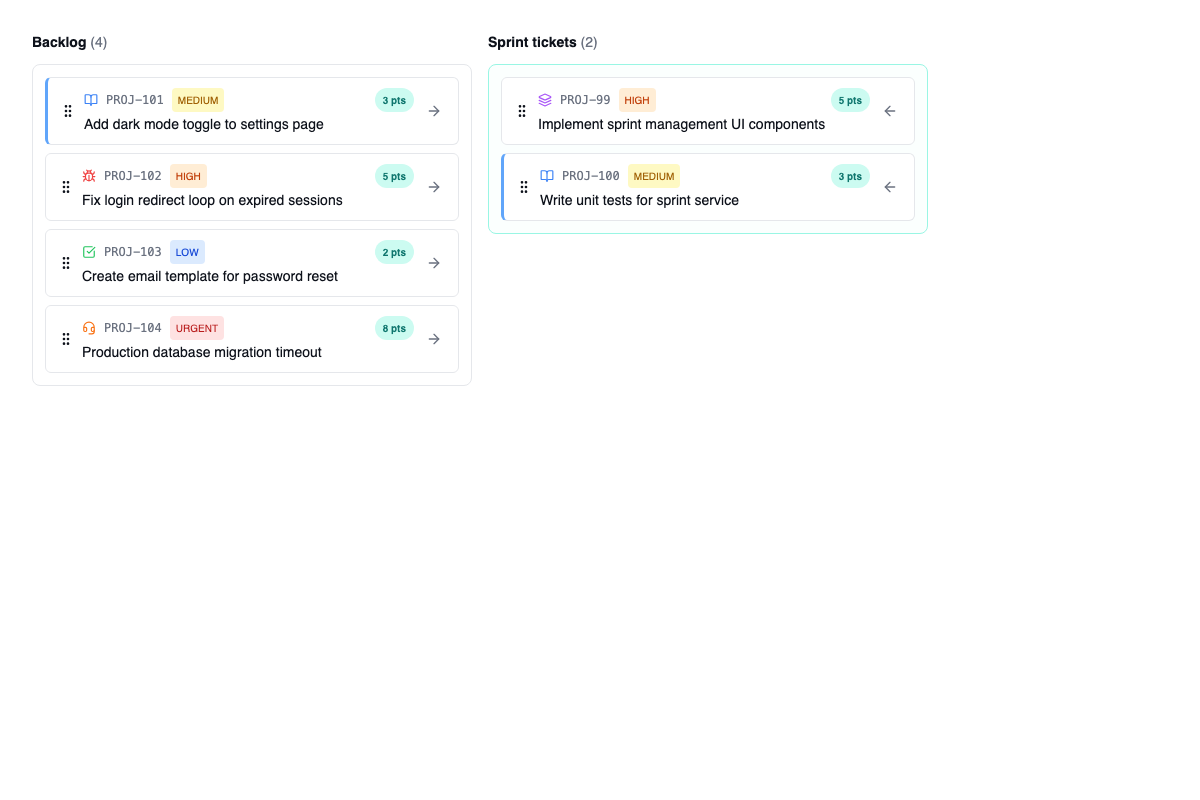
From backlog to sprint with drag & drop and story points
Planning a sprint shouldn't take an hour of unproductive meeting. Drag stories from the backlog into the active sprint, adjust story points as you go and see in real time whether you're overloading the team or still have capacity.
Each sprint shows planned vs actual velocity, an automatic burndown chart and the percentage of stories completed. When you close the sprint, unfinished stories go back to the backlog in one click.
- Drag & drop to plan: move stories and tasks between backlog and sprint by dragging them. Reorder priority inside the sprint with the same gesture.
- Story points and capacity: assign points to each story and set the sprint's capacity. The system warns you if you go over the limit before you even start.
- Automatic burndown chart: a daily progress chart that updates itself as the team completes tasks. Nothing to configure.
- Sprint close with a summary: when you close a sprint you see actual vs estimated velocity, completed and incomplete stories, and you can move what's left to the next sprint or back to the backlog.
- Sprint history: review any past sprint, its velocity, what was delivered and what was left out. Data to improve sprint after sprint.
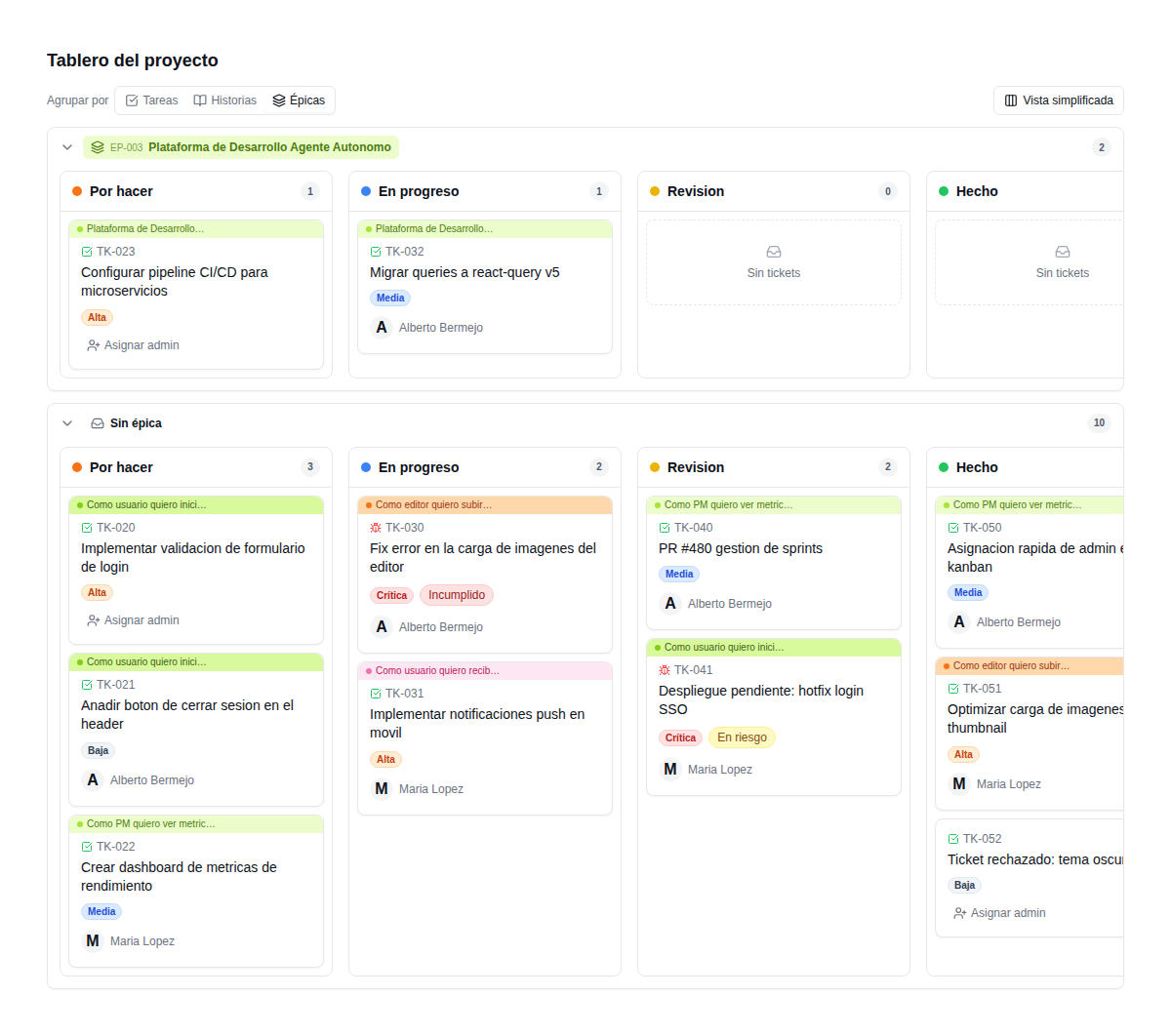
Epic, story, task, bug: each type with its own purpose and colour
Not everything is "a ticket". An epic groups a big chunk of functionality. A story describes value for the user. A task is concrete work. A bug is something that doesn't work. Each type has its icon, its colour and its flow.
Stories nest inside epics. Tasks and bugs link to stories. An epic's progress is calculated automatically from its stories. You see at a glance which big feature is at 80% and which hasn't started.
- Automatic epic progress: the epic's progress bar is derived from the stories completed inside it.
- Colour coding on the Kanban board: each item type has its own colour on the board. You see at a glance whether bugs are piling up or an epic is moving.
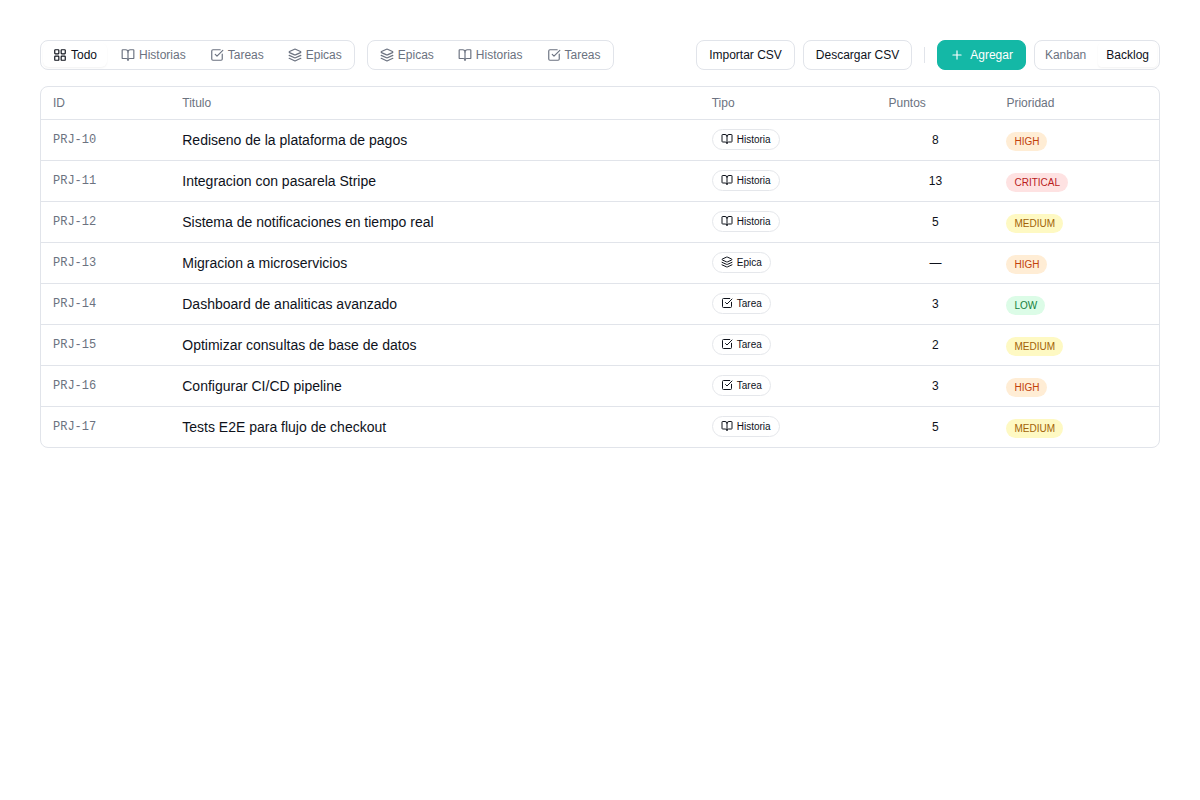
All outstanding work in one ordered, filterable, exportable list
The backlog is the single source of truth for everything left to do. A list view with filters by type (epic, story, task, bug), assignee, sprint, status and priority. Each item shows a progress bar if it has children.
Import work from a CSV if you're coming from another tool. Export the backlog to CSV to share with the client or for planning meetings. No copy-pasting between tools.
- Combinable filters: filter by type + assignee + sprint + priority at once. Find exactly what you're after in the backlog in seconds.
- Progress bar per item: every epic and story visually shows the percentage of children completed.
- CSV import: bring your backlog over from Jira, Trello, Asana or any spreadsheet. Columns are mapped automatically, with a review step before importing.
- CSV export: export the whole backlog or a filtered slice to share with clients, build reports or keep an external backup.
- Ordering by priority: drag to reorder priority. The item at the top is the most important. No confusing numeric fields.
Define what "done" means before you start building
Every story has its acceptance-criteria checklist: the conditions that must be met for the story to count as complete. No ambiguity, no "I thought that…". Everything is written down before work starts.
Criteria link to the technical tasks. When every task behind a criterion is complete, the criterion is ticked automatically. The story's progress bar reflects how many criteria are validated versus outstanding.
- Checklist per story: add as many criteria as you need. Each one is a concrete, verifiable condition.
- Criterion-to-task linking: attach technical tasks to each criterion. As the task is completed, the criterion advances.
- Visual progress: a progress bar and a counter of criteria completed versus total. The client sees exactly how their story is progressing.
- Validation before closing: a story can't move to "Done" until all its acceptance criteria are validated.
Each client is a project. Switch context without losing the big picture.
If you run development for several clients, each one gets its own independent project with its backlog, sprints, epics and KPIs. Switch project in one click from the selector at the top.
But you also need the big picture. The consolidated dashboard shows velocity across all projects, how many stories are in flight in total, which sprints close this week and where the bottlenecks are. Portfolio management without extra tools.
- Project selector: switch between client projects from the top bar. Each project keeps its full context isolated.
- Consolidated dashboard: a global view with aggregated metrics for every active project. Velocity, stories in progress, open sprints.
- KPIs per project: average velocity, lead time, cycle time, bug-to-story ratio, story points delivered per sprint.
- No project limit: create as many projects as you have clients. No extra cost per project or per user.
Stop running sprints in spreadsheets and disconnected boards
We'll show you what your project management would look like with epics, sprints and acceptance criteria all in one place. No commitment, no cost, no per-user licences.
We reply within 24 working hours. No commitment.
Frequently asked questions about project management
Can I use Kanban and list at the same time, or do I have to choose?
How do story points work? Are they mandatory?
Can I import my backlog from Jira, Trello or Asana?
Is there a limit on users or projects?
Can I share the project's progress with my client?
Do acceptance criteria link to the technical tasks?
Can I customise the Kanban board's statuses?
How are bugs handled? Are they different from tasks?
Tell us your challenge. We'll propose a solution.
No commitment. Within 24 hours, you'll receive a proposal with scope, timeline and budget. No fine print.