Stop giving hours away to your clients without noticing
Agencies and consultancies lose between 15% and 30% of their billable hours simply for lack of a clear tracking system. Tickets solved "in five minutes" that really take twenty, support tasks nobody logs, quick tweaks that never get invoiced. That time is money walking out of the door.
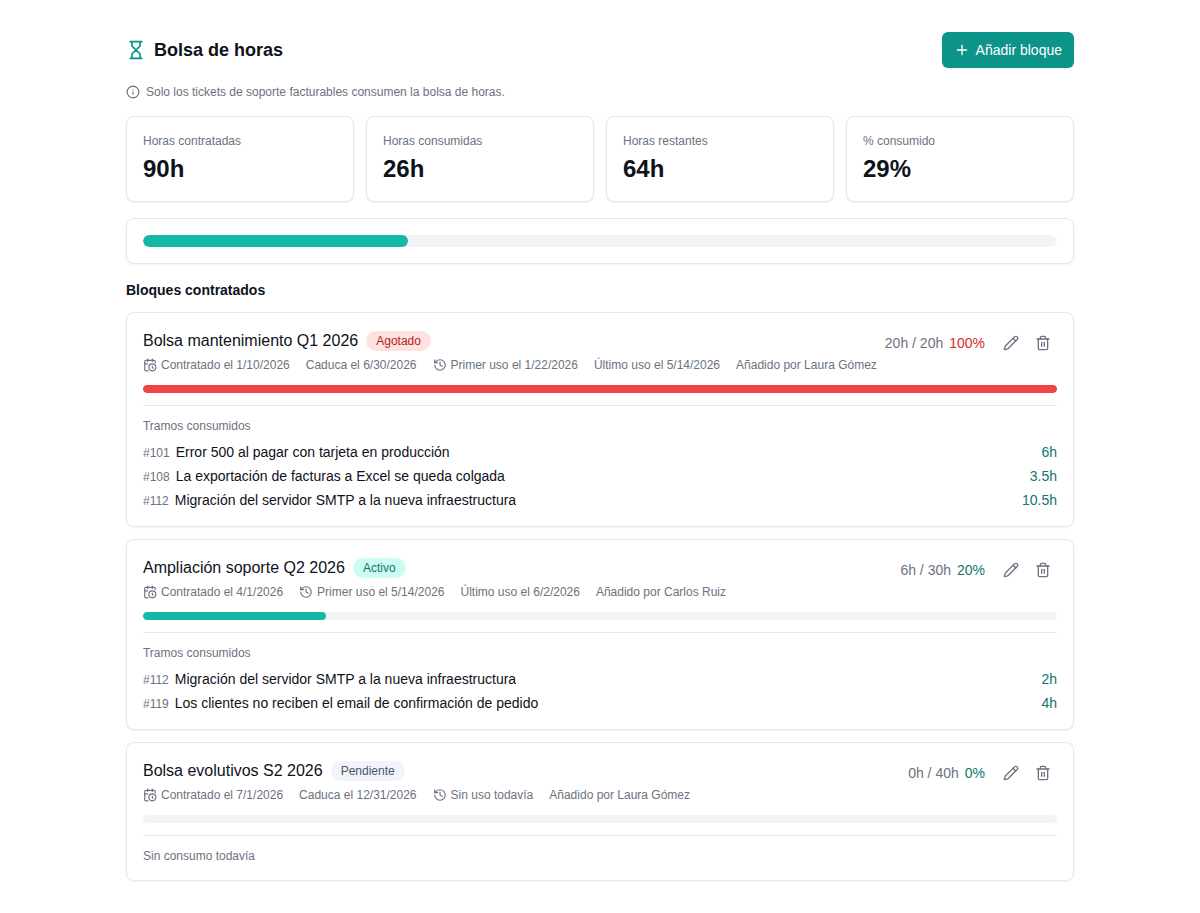
Soamee lets you sell blocks of hours to your clients, track consumption automatically with every support ticket and know at any moment how many hours are left, how many have been used and when it's time to renew.
Blocks of contracted hours with full control in real time
Each client contracts a block of hours: 10, 20, 50 or however many they need. In Soamee you create the bank in one click, set an expiry date if it applies, and the system handles the rest. Every billable minute of support is deducted automatically when a ticket is closed, with no manual step.
A visual progress bar always shows how many hours are left, how many have been used and the pace of consumption compared with previous months. That tells you whether the client will run out sooner than expected so you can get ahead of the renewal.
- Flexible contracting: create banks of any size (hours, half-hours or minutes). Each bank belongs to one client and has its own independent balance.
- Optional expiry date: decide whether the bank expires after 3, 6 or 12 months, or whether hours roll over without limit.
- Visual progress bar: percentage used, hours remaining and an estimate of when it will run out based on the current pace.
- Bank history: review previous banks, renewals, roll-overs and how each client's consumption has evolved over time.
- Multiple banks per client: the same client can have separate banks by project, department or service type (support, development, consulting).
How the ticket-to-bank link works
The ticket is created by email, through the portal or manually. It is linked to the client and their active bank.
The built-in timer or a manual time entry stays attached to the ticket. No spreadsheets, nothing forgotten.
Billable time is automatically subtracted from the client's bank. The balance updates instantly.
Full transparency: the client knows which ticket used which time, in detail and with justification.
Every support ticket draws down the bank automatically
The real problem with hour banks isn't creating them: it's keeping them up to date. If you depend on someone writing hours into a spreadsheet at the end of the day, you lose accuracy, you lose money, and you lose the client's trust when the numbers don't add up.
In Soamee the link is direct: every ticket has a time-spent field. When the agent closes the ticket and marks the time as billable, it is deducted automatically from the client's active bank. No intermediate steps, no manual reconciliation, no hours left in limbo.
- Built-in timer: start and stop the clock from the ticket itself. Time is recorded to the minute.
- Billable vs non-billable: mark each time entry as billable or internal. Only billable time draws down the bank.
- Full traceability: every hour used has its ticket, its agent, its date and a description of the work done.
A warning before they run out: never work for free again
The usual scenario goes like this: a client ran out of hours two weeks ago and nobody noticed. The team kept solving tickets and those hours are gone for good. When the invoice arrives, the client argues because they were never warned; when it doesn't, the agency swallows the loss.
Soamee sends configurable alerts when a bank hits critical thresholds. You set the percentages: a warning at 75%, 90% and 100%, for example. Alerts reach your internal team and, optionally, the client too. When the bank is exhausted you can block new billable tickets or allow them with an overage warning.
- Configurable thresholds: set alerts at 50%, 75%, 90% or any percentage you need, per client or per bank.
- Notify admin and client: choose who gets each alert. The client can receive a friendly renewal reminder.
- Optional block on exhaustion: stop hours being logged against an empty bank, forcing a renewal before work continues.
- Overage notice: if work is allowed without a bank, the system marks those hours as "overage" for separate invoicing.
Admin view
- Every bank of every client
- Hourly cost and margin per bank
- Time per agent and ticket
- Edit, adjust and void entries
- Configure alerts and blocks
- Profitability reports
Client view
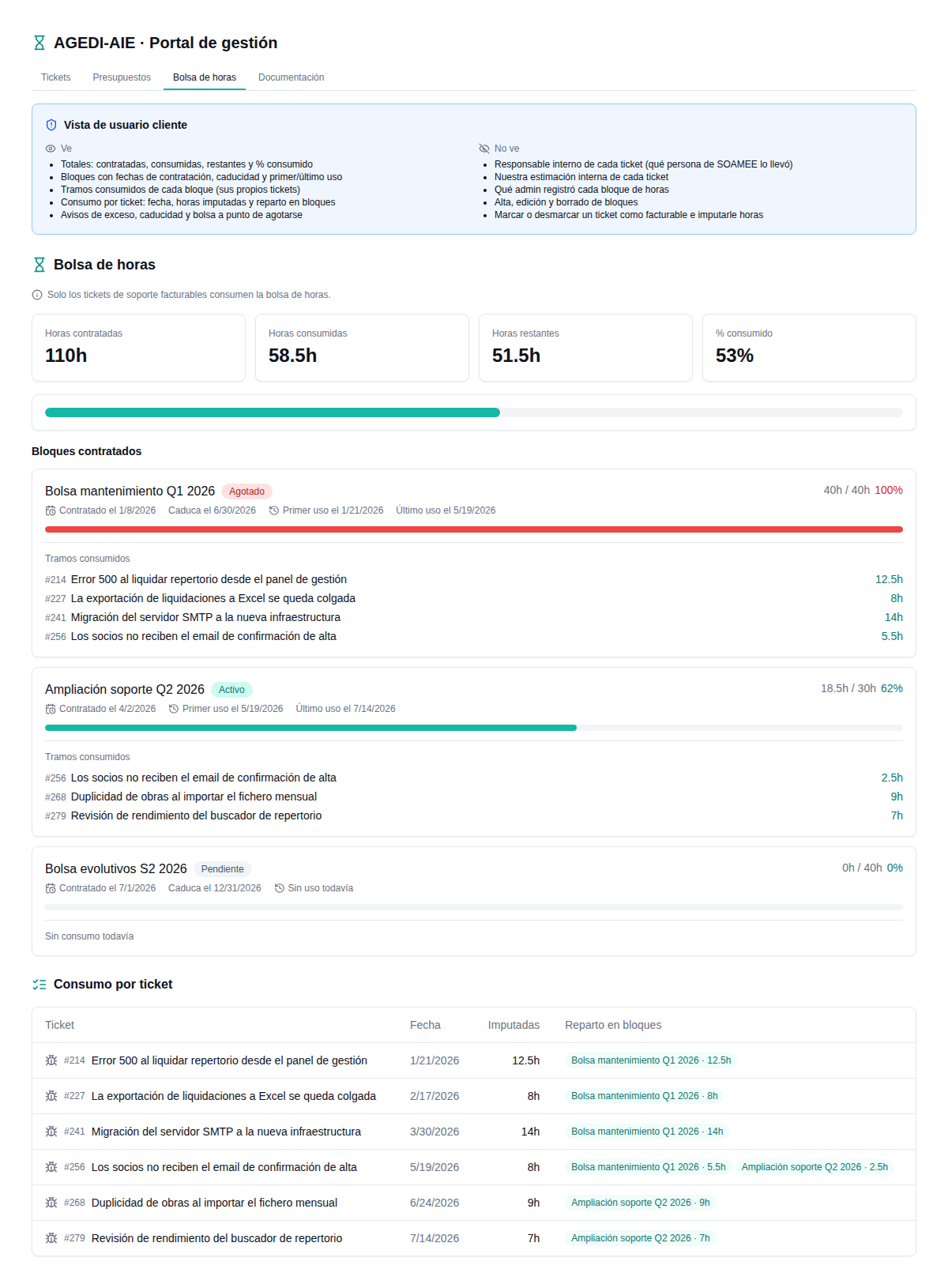
- Only their banks and their usage
- Progress bar of remaining hours
- List of tickets with time logged
- Download a PDF statement
- No access to internal costs
- No access to other clients' data
Your team sees everything; your client sees only what they need
Transparency with the client is essential to build trust, but total transparency can backfire. Your client needs to know how many hours they have used and on which tickets; they don't need to see your team's hourly cost, the bank's margins or the internal profitability of the contract.
Soamee offers two completely separate views. The admin (your team) sees all the financial information, configures alerts, manages banks and analyses profitability. The client gets a limited portal where they see their usage, their tickets and can download PDF statements. Each role sees exactly the information it should.
- Client portal without Soamee branding: customisable with your logo, colours and corporate identity (white label).
- Granular permissions: control which fields, columns and sections each type of user sees.
- Access by invitation: the client signs in with a secure link, with no extra passwords to manage.
A full timeline plus PDF export to account for every hour spent
The most uncomfortable question a client can ask is: "What did you spend the 20 hours of my bank on?". If the answer depends on digging through emails and spreadsheets, you have a problem. In Soamee the answer is one click: export the usage report as PDF.
Every bank has a detailed timeline: date, ticket, agent, time spent and a description of the work done. The PDF is generated automatically with your logo and your agency's layout, ready to send to the client as a statement of the hours used. No arguments, no rebuilding data, no time lost documenting after the fact.
- Chronological timeline: all time entries ordered by date with ticket, agent and task description.
- PDF export with your branding: your agency's logo, colours and tax details on the generated document.
- Filter by period: generate reports for the month, the quarter or the whole life of the bank.
- Executive summary: the PDF includes a summary with total hours, hours remaining, number of tickets and average time per ticket.
- Scheduled automatic delivery: set up a monthly automatic send to the client with the period's usage report.
What the statement PDF contains
Client name, contracted hours, validity period, current balance.
Date, ticket reference, assigned agent, time spent, description.
Total used, remaining, bar chart by week or month, trend.
Logo, legal name, tax ID and contact details of your company.
Every unlogged hour is money you give away
We'll show you how the hour-bank module works with your own data. We set up a test bank, link sample tickets and you generate your first usage report in under 15 minutes. No commitment.
Everything you need to know about hour banks
What is an hour bank and how does it work?
Can I have several active banks for the same client?
What happens when a bank runs out of hours?
Can the client see how many hours are left?
How is time recorded on each ticket?
Do unused hours roll over or expire?
Can I export a report of used hours for the client?
Is there any vendor lock-in?
Tell us your challenge. We'll propose a solution.
No commitment. Within 24 hours, you'll receive a proposal with scope, timeline and budget. No fine print.