The hospitality POS that understands how a real restaurant works
An interactive floor plan, orders taken on the waiter's phone, flexible payment with every method, and real-time floor analytics. Built for how a restaurant actually runs, not for a shop.
No proprietary hardware. No per-user licences. It runs on any phone, tablet or laptop with a web browser.
Why retail POS systems don't work in hospitality
A supermarket sells items off a shelf. A restaurant manages tables, service shifts, multi-course orders, kitchen timings, split bills and tips. Different worlds — and your tool should be different too.
They have no concept of a "table"
A generic POS works with individual transactions. It doesn't know table 5 has been occupied for 90 minutes, that it ordered in two rounds, or that the guest at table 3 has been waiting 10 minutes for the bill.
The waiter has to walk to the counter
Classic POS systems are tied to a fixed terminal. The waiter writes on paper, walks to the counter, types the order in. Wasted trips, transcription errors and lost time that translates into fewer tables served per hour.
Inflexible payment
Four friends who want to pay separately? One in cash and another by instant transfer? With a staff discount and the tip included? Generic POS systems aren't built for the real situations a restaurant faces.
A disconnected kitchen
The POS prints a paper slip somebody has to carry to the kitchen. Communication is one-way and analogue. There's no way to know whether a dish is ready, whether an ingredient has run out or whether the chef has questions about an order.
No floor analytics
Which table turns over most in a day? When is the peak and how many staff do you really need? Which part of the terrace is most profitable? A generic POS has no answers. It only counts sales.
Allergens: a legal risk
Regulation requires you to declare the 14 main allergens. A generic POS doesn't link allergens to dishes or surface them to the waiter while taking the order. A mishandled allergy can mean a fine — or something far worse.
The result: the operator ends up paying for a generic POS that doesn't fit, plus paper for the orders, plus more meetings to coordinate the team, plus more of their day spent fixing problems the software should have solved on its own.
See your whole dining room at a glance. In real time.
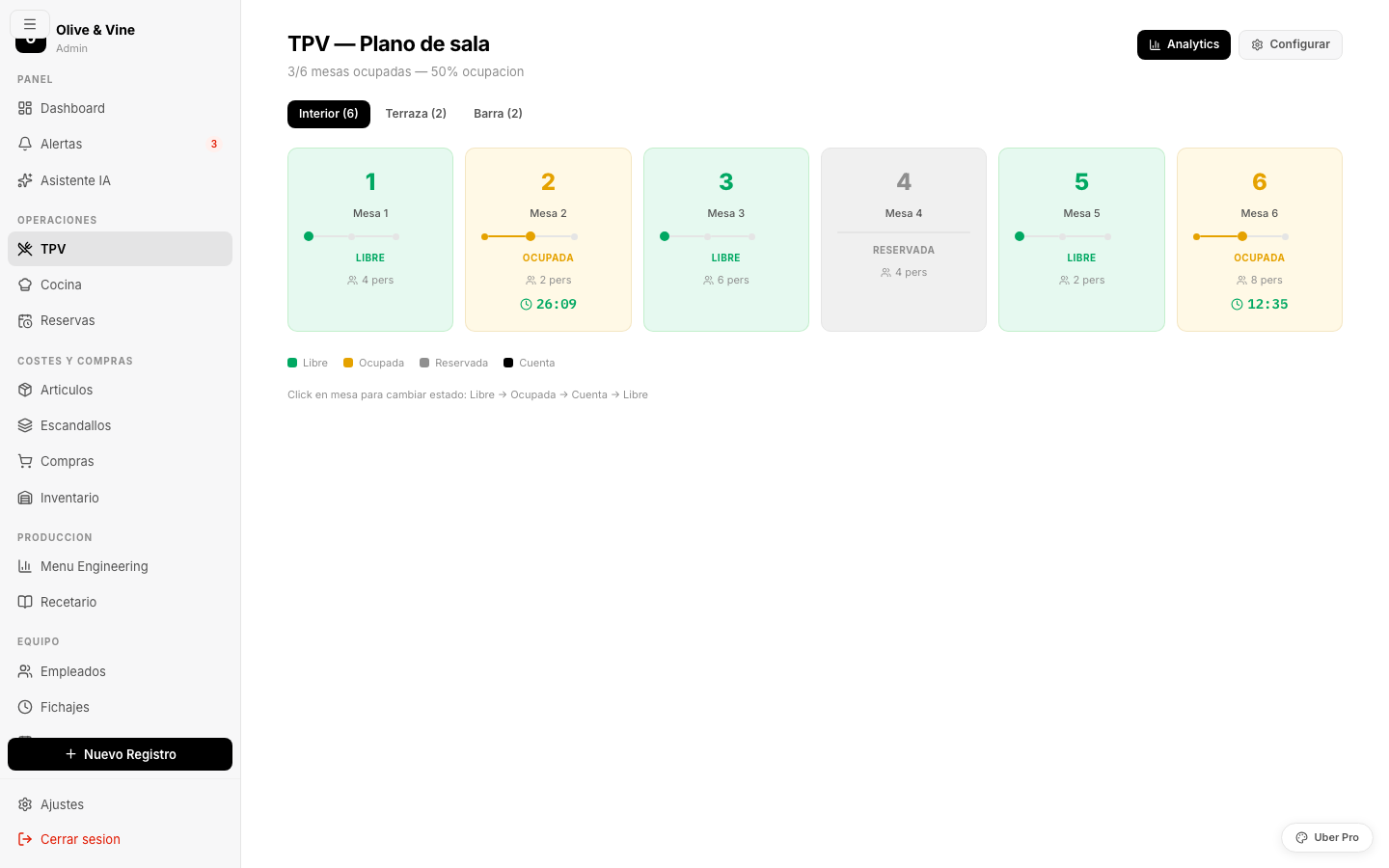
The floor plan is the heart of the POS. Instead of a list of transactions you see a visual representation of your restaurant: every table, its current status, how long the guests have been seated and what they ordered. All at a glance, with nothing to look up.
Bright green. Ready to seat. The waiter sees at a glance which tables are free without asking anyone.
Amber while the guests eat. The timer shows how many minutes they've been there. It turns orange after 75 minutes to flag that turnover is slipping.
Blue once the guests have asked for the bill. It tells the team the table will free up shortly: time to get ready to clear it.
Purple for booked tables. The guest's name and time appear in the tooltip when you hover or tap.
The waiter takes the order at the table. No trip to the counter.
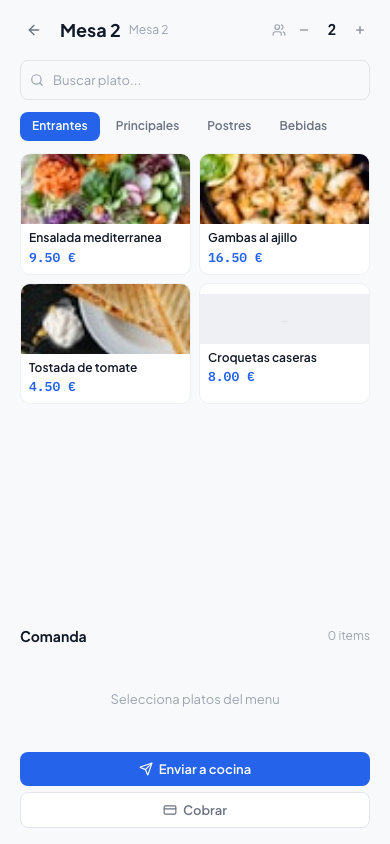
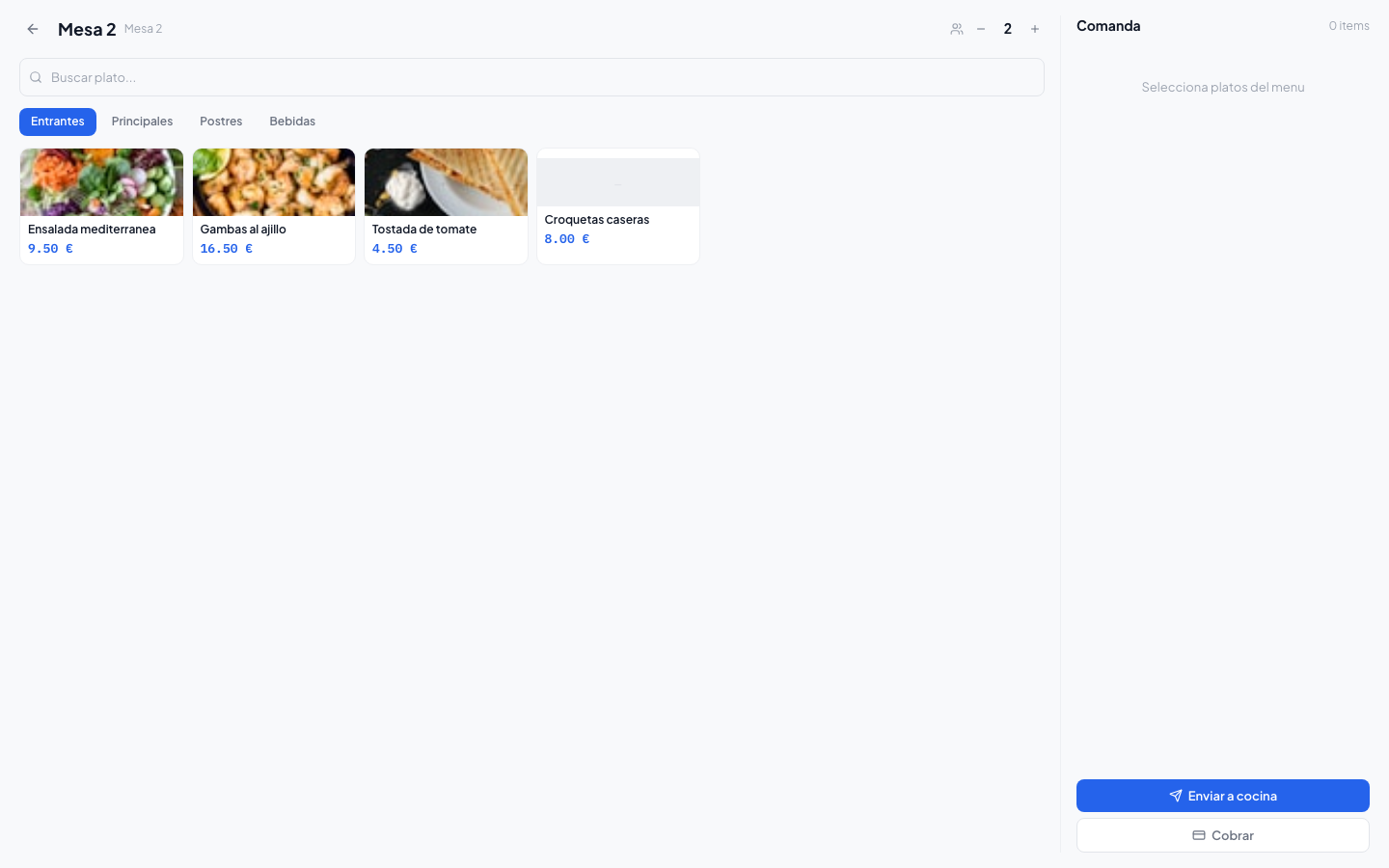
The ordering flow is designed to be done one-handed, standing up, in 30 seconds. No learning curve. No transcription errors. No unnecessary trips.
The whole flow in 4 steps
The waiter taps the table on the floor plan or goes straight in from the table list. If an order is already open, they see it instantly.
Large, touch-friendly categories: starters, mains, desserts, drinks. Every dish with a photo, name and price. Quick search by name for off-menu dishes or daily specials.
For each dish: a free note ("gluten-free", "rare", "no onion") and quick selection of the guest's allergens (14 buttons set up per European regulation). Notes are highlighted on the kitchen screen so they don't slip past.
The order reaches the kitchen display in under a second. The waiter gets a visual confirmation. The kitchen immediately sees what's pending and in what order it arrived.
Follow-up rounds, no problem: the waiter can add dishes to an open order at any time. The kitchen only receives the new dishes, not the whole order again.
Any change to the menu (a new dish, one sold out, a price change) reflects on every device instantly. Nothing to print or update by hand.
The set lunch or a tasting menu has its own logic: the waiter picks a starter, a main and a dessert from each category. The menu price applies automatically.
Mark any dish as on the house. It's recorded in the system with the reason, without disturbing the payment flow or the real sales figures.
If the guest changes their mind before the kitchen starts the dish, the waiter can cancel it. If it's already being prepared, it needs confirmation and is logged.
For groups paying separately: the waiter assigns each dish to guest 1, 2, 3… When it's time to pay, the system already knows who had what.
Quick access to the day's recent orders. Handy for complaints, for a guest who wants the same order as last week, or to verify any operation.
Any payment method, any combination, no fuss
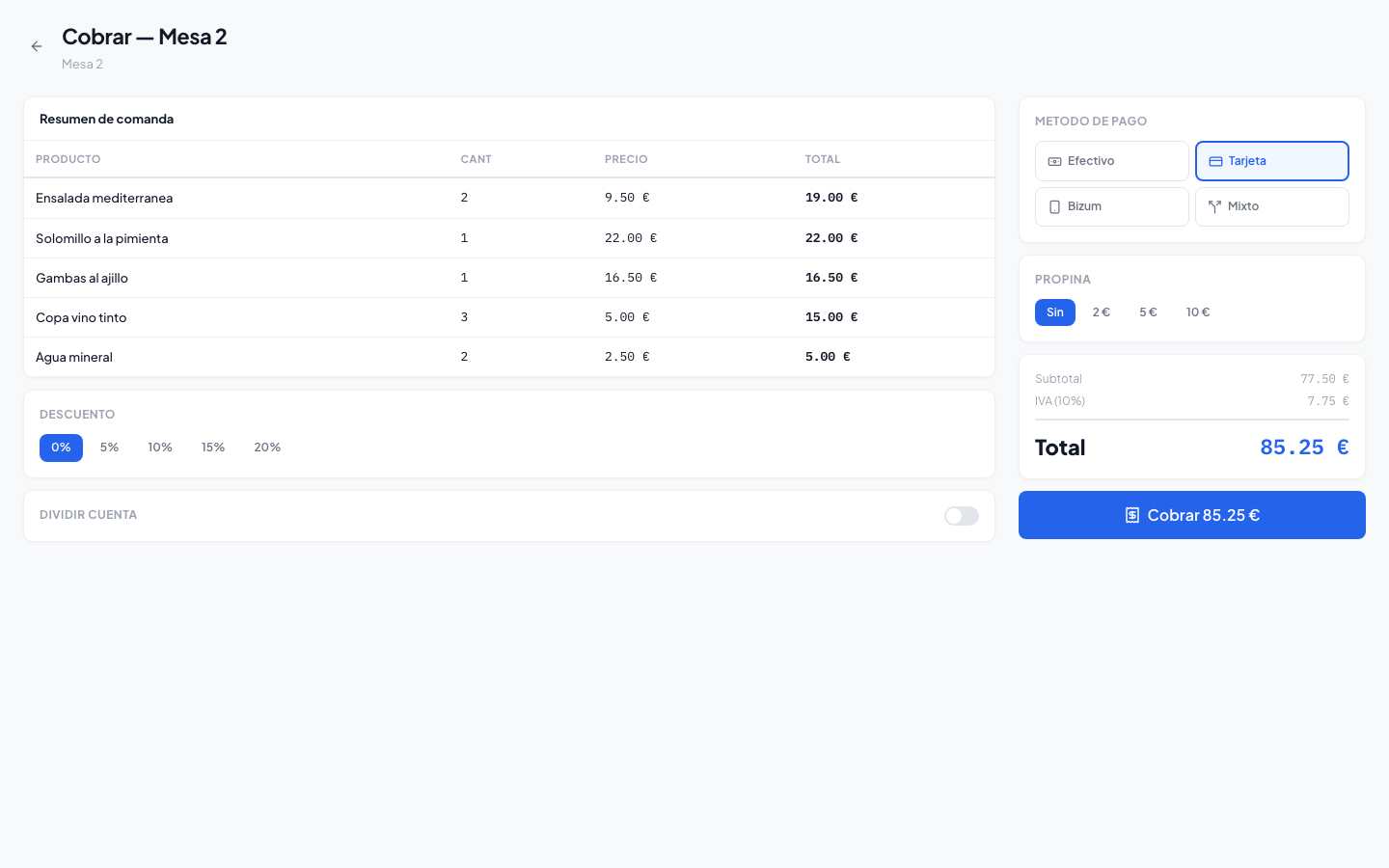
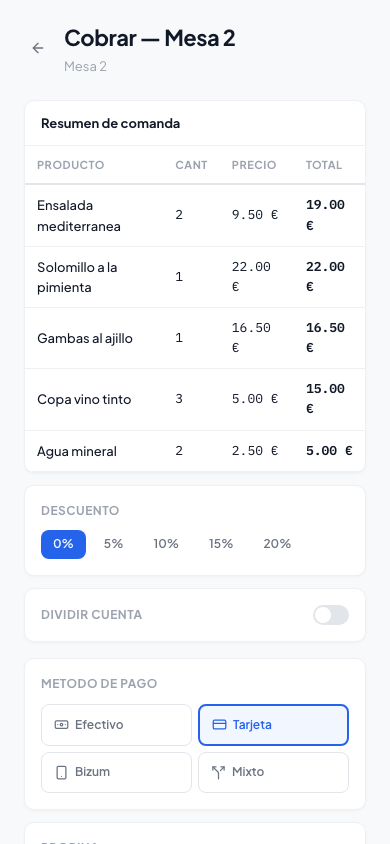
Payment is the last moment with a guest before they leave. If it's slow or awkward, it leaves a bad taste even after a perfect meal. Our payment module is designed to handle any real-table situation in seconds.
- Cash with change calculation
- Credit / debit card
- Instant transfer (via QR or number)
- Meal vouchers / Sodexo
- Split payment (several methods)
- On account (regulars)
- Whole bill
- Split evenly
- Pay per guest
- Pay for individual dishes
- Add a tip (% or fixed)
- Percentage or fixed discount
Digital or printed receipt: send the receipt by email or WhatsApp, or print it on any compatible thermal printer (you don't have to buy ours).
Simplified or full invoice: generate invoices with the customer's tax details for companies that need an expense record.
Automatic till reconciliation: at the end of the shift the system summarises sales by payment method, tips and discounts. Reconciliation takes seconds.
Occupancy data that turns your instinct into profitable decisions
You've known by eye for years that Tuesdays are quiet and Friday at 2pm is chaos. Now you have the exact numbers to act on: staff to the right level, adjust the menu to demand and optimise every zone of the room.
Know your room's real occupancy during each service. Work out whether you have a capacity problem or a bookings problem.
Know how long a guest takes to eat on average. Optimise bookings to maximise turnover without rushing anyone.
How average spend evolves day by day and week by week. See whether a promotion is working or a menu redesign has lifted spending.
Occupancy heatmap by table
A visual heatmap showing which tables are most in demand and which go unnoticed. Useful for deciding where to seat a birthday party, which part of the terrace to promote, or how to rearrange the plan to improve service flow.
- By time slot (lunch vs dinner)
- By day of the week
- By zone (room, terrace, bar, private area)
Hourly sales curves
A bar chart of sales accumulated every 30 minutes through the day. See exactly when lunch service starts, when it peaks and when it drops. Compare weeks to see whether the peak is shifting earlier or later, and adjust kitchen shifts accordingly.
- Sales vs orders vs covers
- This week compared with last
- Exportable to CSV for external analysis
Ranking of best-selling dishes
A list ordered by units sold, with weekly evolution. Cross-referenced with the costing module, it also shows each dish's margin. That tells you whether your best seller is also your most profitable, or whether you're working hard for little return.
- Units sold per period
- Revenue and margin per dish
- Alerts for dishes whose sales are falling
Performance per waiter
Individual metrics: tables served, average spend generated, average service time per table, orders sent. Not to police anyone, but to spot who needs training, who deserves a bonus and where the team's bottlenecks are.
- Average spend per waiter
- Tables served vs shift worked
- Comparison between team members
It runs on the devices you already own
We don't make you buy or rent special hardware. If you have an Android phone, an iPad, an old laptop or a second-hand kitchen monitor, our POS runs on all of them.
iOS or Android, 5" screen or larger. The waiter uses their own phone or one belonging to the restaurant. No app to install: open the browser and go.
iPad, a 10" Android or similar. Ideal for the host: manage the plan, assign tables and keep an eye on bookings on a big screen.
At the till. Any laptop with Chrome or Firefox. Perfect for the manager who takes payments, handles stock and reviews the day's reports.
Any TV or monitor with a mini-PC or smart TV. The kitchen display is optimised for 1920px and mouse-free use (touch or physical buttons).
If the router plays up during service, the POS keeps running locally. It syncs automatically when the connection returns.
The waiter only sees their tables. The supervisor sees the whole shift. The manager gets historical reports. Nobody has access to what they don't need.
Being web-based, updates roll out without anyone doing a thing. Tomorrow you have the new version with nothing to install and no service interrupted.
The POS is the hub. Every other module feeds off it automatically.
Every sale the POS records updates the inventory, the costings, the P&L and each waiter's metrics in real time. No copying data between systems. Nothing to reconcile by hand.
Every dish sold deducts its ingredients from stock according to the costing. The inventory stays current without counting anything by hand.
POS sales feed straight into the P&L. At any moment you can see how much you've sold, how much you've spent and what margin is left.
Every order sent appears instantly on the kitchen screen. The chef confirms when a dish is ready and the waiter gets the notification.
Booked tables show as blocked on the floor plan. When the guest arrives, the waiter turns the booking into an active service with one tap.
Every payment taken on the POS is recorded automatically in the till by payment method. The daily close takes 30 seconds.
All POS data exports to Excel, PDF or straight to your accountant. The monthly close that used to take hours now takes minutes.
Request a POS demo
and see how it works in your restaurant
We do a 30-minute video call, show you the POS running for real and go through how you operate today. No commitment, no cost.
We reply within 24 working hours. No spam.
What people ask us about the POS
Can I start with just the POS without taking the whole platform?
Does it work without internet during service?
Do I need to buy special hardware (printers, card readers, tablets)?
How long does a new waiter take to learn the system?
Does the POS comply with Spanish tax regulation (Verifactu)?
Tell us your challenge. We'll propose a solution.
No commitment. Within 24 hours, you'll receive a proposal with scope, timeline and budget. No fine print.