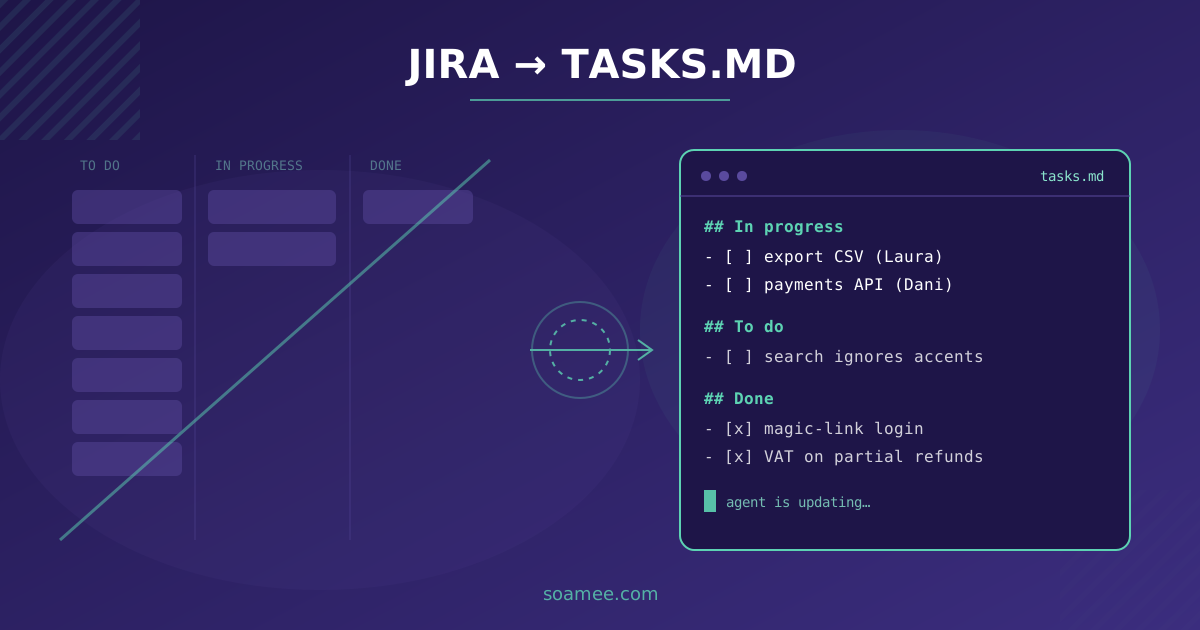
The last ticket we opened in our Jira for one of our own projects is from February. Nobody decided in a meeting to stop using it. It just happened: every time someone wrote a ticket, they ended up writing the same thing again in the agent’s prompt, and nobody read the ticket after that. After a few weeks, people stopped writing the first version.
Today each project’s work lives in a text file, tasks.md, inside the project itself, and the agents fill it in as they work. It works better for us than Jira at almost everything. At one thing it works worse, and it’s the one that hurts most: knowing what everyone is doing.
This is an opinion piece. I think Jira, like almost any ticket tracker, is built to ration developer hours, which for twenty years were the most expensive part of a project. With agents, writing the code takes minutes or hours. The expensive part now is knowing what you want and checking that what came back is right, and a ticket board helps with neither.
It’s also a work in progress. We’ve been running this system for eight months, we’ve changed it four times, and we’ll change it again. Here’s what went well, what went badly, and what we still don’t know how to solve.
One disclaimer first: we’re an agency, and part of what we sell is development hours. If estimating in hours stops making sense, we feel it before anyone else.
What Jira was for
Strip away the integrations, the colors and the custom fields, and Jira is left with four functions:
- A queue: what needs doing, and in what order.
- An assignment: who does what.
- An estimate: how much it will cost, in hours or points, so you know what fits in a sprint.
- A status: where each item stands, so someone who isn’t coding knows without asking.
All four revolve around one scarce resource: the time of a person who can program. Sprints exist because that time runs out every two weeks. Story points exist because you have to divide it up before you spend it. The “In Progress” and “In Review” columns exist because a task could spend days in each.
For years we worked that way, and it worked. Backlog refinement on Mondays, sprint planning every two weeks, a retro that sometimes got skipped, and one board per project. The board was how the client, the project manager and the team all saw the same thing.
What changed with agents
The first thing we noticed was that estimates stopped adding up, and not because they were bad. A 3-point task, which used to be a day and a half of work, was done in an afternoon. A 5-pointer, in a day. The 8-pointers still took as long or longer, because the hard part there was never the typing. It was understanding what needed to be done.
For a couple of months we tried to recalibrate the points. It didn’t work. How long a task took no longer depended on its size. It depended on how well it was explained. A large but clear task shipped in a morning. A small but ambiguous one could burn two days of back and forth, because the agent would confidently build something that wasn’t what we wanted, we’d explain it again, and it would build something else.
That’s when we understood the bottleneck had moved. Work used to get stuck on “who has time to do this”. Now it gets stuck in two places:
- Before starting: writing down clearly what you want. Not a two-line ticket, but the context, the constraints, what not to touch, and how you’ll know it’s right.
- After finishing: reviewing what the agent did. Reading the change, testing it, figuring out whether it broke something you can’t see.
Jira has no column for either. It has “To Do”, “In Progress” and “Done”, and most of the effort no longer happens in “In Progress”.
The other thing that changed was how long a task sat in each state. If a task is “In Progress” for forty minutes, moving it on the board costs almost as much as doing it. People stopped moving the cards. The board started lying. And a board that lies is worse than no board at all, because someone looks at it and believes it.
The tasks.md
The alternative came out of a small project, almost by accident. One developer started leaving the agent a to-do list in a text file at the root of the project, so he wouldn’t have to re-explain the context every morning. Within a week the agent was updating that list on its own: checking off what it finished, adding what it ran into along the way, and noting why it left something half done.
We copied it to the rest of our projects. Every one has one now, and it looks like this:
# Tasks

## In progress
- [ ] Export orders to CSV with a per-store filter (Laura, since Oct 14)
  - Still to do: test with more than 10,000 rows
- [ ] Switch payment gateway to the new API (Dani, since Oct 15)

## To do
- [ ] Search ignores accents ("gestion" doesn't find "gestión")
- [ ] Review legal copy on the checkout page (waiting on the client)

## Done
- [x] Magic-link login by email (Laura, Oct 13)
  - Password login removed on mobile at the client's request
- [x] Fixed VAT calculation on partial refunds (Dani, Oct 11)
The rules are few:
- The agent reads it at the start of every session. That way it knows what’s open, who owns it and what was decided before, without anyone telling it.
- The agent updates it when it finishes. It moves what it did to “Done”, with one line on what changed and, if needed, why. If it found something broken that wasn’t its job to fix, it adds it to “To do”.
- People read it and correct it. If a priority changes, someone moves the line by hand. Nobody has to “move cards” to keep the status current, because the status is written by whoever does the work.
- Anything that doesn’t fit on one line goes somewhere else. Design decisions and project rules live in a separate file the agent also reads.
tasks.mdis just the list.
Compared to Jira, it wins on three things. It lives with the code, so it’s saved, versioned and recovered along with it. The agent reads it without integrations, permissions or connectors, because it’s text. And a person can read the whole thing in thirty seconds, which is more than you can say for a board with a hundred and twenty cards.
It loses on others, and I get to those below.
What went well
The change that came out of the meeting
This spring we had a check-in meeting with a client in the distribution business. Halfway through, their head of operations said the orders report we’d delivered was fine, but what they really needed was to see it per store and be able to download it to send to each store manager.
Under our old process, that would have been a ticket, refinement the following Monday, an estimate and, with luck, a slot in the sprint after that. Two weeks, being optimistic.
The developer in the meeting wrote it into tasks.md while they were talking, in the client’s own words. When the meeting ended, she opened a session with the agent. At five that afternoon we sent the client a link to the staging environment with the per-store filter and the download. The head of operations replied with a WhatsApp voice note that we still play now and then.
The agent did its part, but what saved the two weeks was that there was nothing between the request and the code: no ticket, no queue, no planning. All it took was understanding what the client was asking for, and we had that because we were in the room.
The MVP that shipped early
For a startup, we’d planned a first product in six weeks: user sign-up, a dashboard with three views, payments and notifications. It shipped in two and a half.
What mattered most was that, without sprints, the client saw progress every day and corrected course every day. In the second week, when she realized nobody was going to use one of the three dashboard views, we removed it that same afternoon. In a two-week sprint that change would have arrived late, with the view already built and tested.
The founder told us afterwards that we were the first vendor she’d worked with where she didn’t feel like she was waiting.
The client who stopped asking for the weekly report
We used to send several clients a weekly status report. The project manager wrote it on Fridays, from the Jira board, and it took a good hour.
One client asked whether he could just look at “that list you use”. We gave him read access to the tasks.md. Two weeks later he asked us to stop sending the report: he preferred to check the list whenever he felt like it, and everything he needed was there. In his words, the file told him more than the report, because every line had been written by whoever did the work.
Not every client wants it that way, and that’s fine. But none has asked to go back to the board.
One-day onboarding
When someone joins a project midway, they usually spend two or three days reading tickets, asking questions and figuring out what’s half finished. This summer a new developer joined a project that had been running for four months. He asked the agent to read the tasks.md and the rules file and explain the state of the project. He closed his first task that same morning.
Fewer meetings
We dropped sprint planning and refinement. We still talk, just differently: ten minutes in the morning to say what everyone is going to work on, and short conversations when something needs deciding. After a month, people on the team said they had whole afternoons to work without interruptions, and it showed in what shipped.
What went badly
Two people, the same task
One Tuesday, two developers fixed the same bug at the same time. The client had reported it through two channels, one saw it in email and the other in the project chat, and each handed it to their agent. Neither checked tasks.md before starting, and neither did the agents, because the task wasn’t written down yet. We noticed at review: two different fixes for the same thing, both reasonable and incompatible with each other.
We lost an afternoon. Not much, but it’s exactly what a board with an assignee prevents, and we had removed it.
”In progress” for nine days
On another project, a task sat as “In progress” for nine days. The person who owned it had been pulled onto an urgent project and didn’t move it. Every time the agents read the file, they assumed someone was on it and left it alone. We found out when the client asked about that feature.
A file that fills itself in is filled in with what the agent knows. What happens outside the session (someone switches projects, a client changes their mind on a phone call) doesn’t reach the file unless a person writes it down.
The agent that called something done when it was half done
The agent updates tasks.md, and the agent is sometimes optimistic. We’ve had tasks marked done that were only half done: the export worked, but not with the client’s real data; the form submitted, but the confirmation email never went out. The file said “Done” with the same confidence in both cases.
Since then, a task isn’t done because the agent says so. It’s done when a person has reviewed it, and the agent can’t tick that box.
”What are you working on right now?”
This one has cost us the most. A client called one Thursday and asked, fairly, what we were working on that week. The project manager didn’t know for sure. Two people were on the project, each with two or three agent sessions open, and tasks.md reflected what had been finished, not what was happening at that moment. He had to ask in the team chat and call the client back twenty minutes later.
With Jira, you answered that question by looking at a column. That column was often wrong, but you could answer.
The speed trap
The client from the meeting got used to things arriving the same day. Three months later he asked for an integration with his invoicing system, which depended on an outside vendor and on permissions that took a week to come through. To him, a week was painfully slow. Before, the same integration would have been a whole sprint and would have seemed normal.
Moving fast changes what the client expects, and when something can’t move fast, you have to explain it before they ask. We learned that late.
The problem we haven’t solved: working in parallel
If there’s one thing Jira did well that we still don’t, it’s coordinating several people working on the same project at the same time.
With agents, each developer can have several tasks moving at once. That multiplies output, but it also multiplies the chances that two tasks step on the same piece of code, or that two people solve the same problem separately. And tasks.md falls short, because it reflects what’s been decided or finished, not what’s being done right now.
What we do today isn’t sophisticated: developers talk to each other. Before starting something that touches a sensitive part of the project, you say so in the team chat: “I’m going to touch payments this morning”. The ten-minute morning meeting is mostly for that. And the rule is that a task gets written into the file, with a name, before it’s handed to an agent, not after.
It works because there are few of us per project and we know each other. I don’t know whether it would work with fifteen people.
We’ve tried other things that didn’t work:
- One task file per person. Everyone knew their own work and nobody saw the whole. It lasted two weeks.
- Having the agent announce what it’s on. We asked it to write in the file, when starting, what it was going to touch. It did, but when two sessions started almost at the same time, neither saw what the other had written.
- Going back to a board just for in-progress work. It lasted less than the per-person files. Nobody updated it, for the same reason as before.
We’re looking at tools that try to solve exactly this. Orca, from Stably AI, is an open-source desktop app that runs several agents in parallel, each isolated, and lets you see on one screen what each one is doing and compare the results. It solves seeing what each of one person’s agents is doing. Seeing what each person on the team is doing is still open.
What Atlassian and Linear are doing
Tracker vendors have seen the same thing and responded by putting agents inside the tracker.
Atlassian opened Agents in Jira as a beta in February 2026 and announced general availability in May at Team ‘26. You assign a work item to an agent from the same dropdown you’d use for a person, and the agent reads the item and posts its progress there.
Linear made a decision I think is better: an issue is assigned only to people and delegated to agents. The agent does the work, but a human stays accountable. It’s a small distinction on screen and a big one in practice, because it makes clear who answers when the agent gets it wrong, which is exactly what happened to us with tasks the agent called done.
Both approaches share the same underlying problem: they assume a ticket is a good spec for an agent, and almost none are. “Fix login on Safari” is enough for a person who knows who to ask. An agent given that ticket will do something, and it will do it with complete confidence. Making it easy to assign tickets to agents makes it easier to send poorly explained work to something that doesn’t ask questions.
Where Jira is still right
If you’ve read this far thinking “this works because you’re a small team”, you’re partly right. There are places where I wouldn’t remove Jira:
- Several teams that depend on each other. A
tasks.mdcoordinates one project. When the payments team depends on the platform team changing something, and each works on its own thing, you need a shared place where that dependency is visible. - People who aren’t on the project. Leadership, support, sales or compliance need to know what’s happening without opening a file inside the codebase. A board is an interface for them, and that doesn’t change because an agent writes the code.
- Audits. If you’re audited for ISO 27001 or SOC 2, the auditor will want to see that every change has a request, an approval and an owner. If your change-management process is already built on Jira, rebuilding it isn’t worth it.
- A client’s team. When we embed in a client’s product team, we use their tools. With Orquest we used their Jira and joined their dailies. Nothing to debate there: the tracker is theirs.
What these have in common is that almost all of it is communication with people who aren’t in the code. The part of Jira that still makes sense is the part that talks to humans. The part that has lost its point, for us, is the part that planned programmers’ work.
What we’d do if we were starting today
This keeps changing, but if a team asked us tomorrow how to start, we’d tell them this:
- Stop estimating work an agent does. If the team is still pointing forty-minute tasks, it’s measuring the ritual, not the work.
- Put the task list inside the project, in a file the agent reads when it starts and updates when it finishes. It’s the cheapest way to give the agent memory between sessions.
- Write the task down before handing it to an agent, with a name on it. It’s the only rule that has actually saved us from duplicate work.
- A task is only done when a person reviews it. The agent can propose that it’s finished; it can’t decide.
- Talk to the rest of the team before touching something sensitive. A one-line message in chat saves a lost afternoon. We haven’t found anything better yet.
- Close what hasn’t moved in weeks. A task nobody has touched in six weeks is a decision nobody wanted to make. If it mattered, someone will reopen it.
- Keep Jira, or whatever you use, for talking to people who aren’t in the code. Clients who prefer it, leadership, auditors.
Six months from now this post will probably be out of date. If we solve working in parallel, we’ll write about it here. And if someone has already solved it, we’d love to hear how: write to us at info@soamee.com.